
5 Best Rc Boat With Camera In 2026
As an Amazon Associate we earn from qualifying purchases.
Shopping for a remote control boat with a camera can feel confusing at first. Many models look similar in photos, yet they differ in control style, camera quality, size and price. This guide helps beginners who want a simple way to explore pools, lakes and fish tanks from the surface and below it.
The five products in this round-up share a few common traits. Each one is a small, waterproof boat with a built-in camera, a remote or phone-based control and a rechargeable battery. Each one is sold on Amazon at a modest price.
This comparison rests on the listed features and typical use of this kind of product, not on personal testing, so the notes below describe what buyers usually notice rather than what has been measured. Think of it as a map of the options, not a verdict on any single boat.


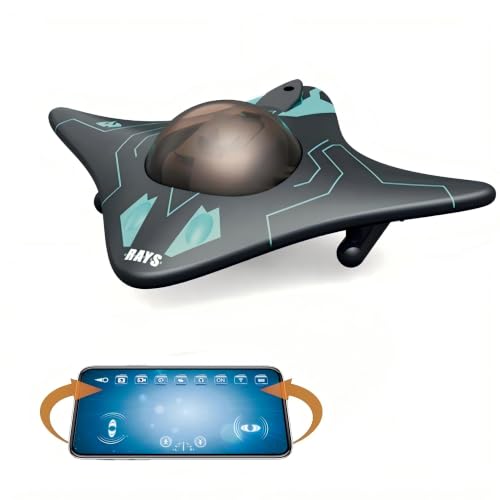
1. GoolRC RC Boats: best for simple phone control on a budget
The GoolRC RC Boat is a small camera boat designed for adults and older children who want to explore calm water. It is listed at the lowest price in this group, which makes it an easy entry point for someone new to the hobby. It suits people who mainly want to take photos and short videos of the water below the surface, such as a family looking at fish in a backyard pond.
Key features in plain words
The boat moves forward, backward and turns left or right. It also takes photos and video and sends a live image to a phone app over a WiFi connection. The camera is mounted to see underwater views, so the phone screen shows what the boat sees in real time. Owners can save clips to their phone to share later.
Real-life use
Most owners of boats like this spend their first sessions learning the controls. Because the app handles steering, the boat often feels more natural to drive once the phone is held steady. A good first step is to practice in an open area with no obstacles, then move to a smaller space once turning feels comfortable. Its small body and streamlined shape suggest it can glide through a pool or pond with little drag.
Gravity sensor mode
The boat can also be steered by tilting or shaking the phone. This gravity sensor mode adds a playful layer that many beginners find fun. It can also feel less precise than button steering, especially when the boat needs to stop or turn quickly. It is best treated as an extra option, with on-screen buttons used when accuracy matters most.
Performance and ease of use
For its price, the boat offers the basic set of functions buyers expect. The app setup is straightforward and an instruction guide is included. Beginners should expect some practice before turning smoothly in tight spaces. Keeping the phone within a clear line of sight of the boat helps the connection stay steady.
Value for money
Given the low price and the core features, this model offers a reasonable entry into camera boats. Buyers who want high-end image quality or long run time may look at other options in this list. A budget boat is a sensible test of if the hobby suits you before spending more.
Pros
- Lowest price in this round-up
- Simple phone app control with live underwater view
- Compact, streamlined body suited to pools and ponds
- Playful gravity sensor steering option
Cons
- Customer standing is described as moderate, so feedback is mixed
- Relies on a WiFi connection, which can drop at longer distances
- Gravity sensor steering is less precise than manual control
- Fewer listed details on battery life and camera resolution
2. Losbenco RC Boat: best for multi-direction steering and kids
The Losbenco RC Boat is a waterproof camera boat aimed at both adults and children aged 8 and up. It is priced above the GoolRC model but sits in the middle of this group. It suits families who want one boat that can be shared and used for both play and photography.
Families often look for a toy that holds attention beyond the first few uses. This boat offers more than one way to play, which can help. It also gives older children a chance to learn basic navigation skills while they enjoy the session.
Movement and control options
The boat can move forward and backward, turn in several directions and rotate in place. It also offers a mobile motion mode, where tilting the phone controls the boat. This range of movement gives users more ways to steer around obstacles or practice precise turns.
For example, a user might rotate the boat in a small circle to position it near the edge of a pool. The same user could then switch to forward and backward controls to cross open water. Having both options can make each outing feel different.
Camera and saved images
The HD camera takes snapshots and video, and images are saved to the phone’s photo folder. The listing highlights clear underwater views. Because saved files go straight to the phone, the photos and clips are easy to share with family or keep as a record of each session.
Saved media also makes it simple to review a session afterward. Users can compare clips, delete the ones they do not want, and keep the best shots. Clear footage depends on water conditions and lighting, so results will vary from one setting to another.
Streamlined body and water movement
The lightweight, compact body is based on a streamlined shape meant to reduce water resistance. This helps the boat move through pools, lakes, rivers and fish tanks with less effort. Its small size also makes it easier to launch and retrieve by hand.
A compact boat is easier to carry to a lake or store in a car or garden shed. Lightweight designs are also less tiring to lift in and out of the water. Users should still check the boat after each session and dry it before storing it.
Setup and app connection
The app is installed by scanning a QR code, which is a square code read by a phone camera. This removes the need to search an app store. Once connected, the phone works as the main controller for the boat.
Scanning the code is usually quick, but the phone needs a working camera and a clear view of the code. Parents may want to complete the setup themselves before handing the boat to a child. Keeping the phone charged during play is also a good habit.
Performance and ease of use
Multi-direction steering makes the boat feel versatile, and the mobile motion mode adds variety. Younger users may need some help with the app at first. Once they learn the basic controls, most users find the boat simple to operate.
Starting with simple forward and backward movement can help new users build confidence. They can add turning and rotation once they feel comfortable. Short practice sessions in a calm area, away from obstacles, make the learning curve easier.
Value for money
The price sits in the middle of the group, and the feature list is broad for that range. Buyers who want a gift for a child or a shared family toy may find it good value. Those who only need basic forward and back movement may find the extras less useful.
Before buying, it helps to decide how the boat will be used most often. A family that plans to take photos and video will likely get more from the camera than a buyer who only wants a simple toy. Comparing the included features with the price of the other models in this group can make the decision clearer.
Pros
- Wide range of movement, including rotation in place
- Mobile motion mode adds an alternative way to steer
- Photos and video save straight to the phone
- Suitable for both adults and children aged 8 and up
Cons
- Customer standing is described as moderate
- Price is higher than the simplest model in this group
- Younger children may need help with app setup
- Motion mode can take time to master
3. Remote Control Shark Pool: best for dual control and a fish-style look
The Remote Control Shark Pool is styled as a robotic fish with a shark-like shape. It is the only product in this group that offers both a dedicated 2.4G remote controller and phone app control. It suits adults who want a sturdier, more hands-on feel and a long-range option.
Two ways to steer
The 2.4G remote is a separate handheld controller that works without a phone connection. The app offers a second route, so users can pick the method they prefer. Having both options gives flexibility, especially for people who do not want to hold a phone while driving.
Dual propeller design
The boat uses two propellers, which is a common way to give steady push and smooth turns in water. Its listed 360-degree rotation helps it turn in small spaces. The result is generally easy control in pools and ponds.
Camera and waterproofing
The built-in waterproof camera sends live underwater images to the app. The listing also mentions a sealed compartment for internal parts. Good sealing is important in water, so this detail matters for longer use.
Size, range and battery
The listed size is about 13.8 by 5.5 by 3.9 inches, which is larger than the mini models in this group. The remote control distance is listed as 25 to 30 meters. The rechargeable battery is listed at about 20 minutes of use after a 40-minute charge, so buyers should plan for short sessions and keep a spare charged battery nearby.
Value for money
This is the most expensive model in the round-up. Buyers pay more for the dual control options, the larger body and the longer listed range. Those who value a separate remote and a larger frame may find it worth the extra cost.
Pros
- Offers both a 2.4G remote and phone app control
- Dual propeller design supports steady, smooth movement
- Listed remote range of 25 to 30 meters
- Larger body that feels sturdy in the water
Cons
- Highest price in this round-up
- Listed battery run time is short at about 20 minutes
- Remote requires two AA batteries that are not included
- Brand is listed as generic, so support may be less clear
4. ynapmoc 6CH Mini Water Waterproof RC Boat: best for quick surface sailing and gift giving
The ynapmoc 6CH Mini Waterproof RC Boat is a small camera boat designed for pools and lakes. It is listed at a price close to the GoolRC model, which places it among the more affordable options. It suits families who want a simple gift for children or adults who enjoy quick surface sailing.
Small camera boats like this one are often chosen by people who want to try the hobby without a large budget. A compact size also makes it easier to store and carry to the water. Before buying, it helps to think about where you plan to use it most.
Automatic start and simple setup
The boat is listed as turning on automatically once it touches the water. This removes the need to find and flip a power switch. Less switching means less fuss for a first-time user.
Still, it is wise to read the included instructions before the first run. Checking that the boat is fully charged and that the app is installed on your phone will help the first session go smoothly.
Movement and control
The six-channel control system allows rotation through a full circle and movement in four directions. Users can also steer by shaking the phone, which adds a fun alternative to the app. Together these options cover most basic driving needs.
Practice in a calm, open area works well for learning the controls. Starting slowly gives you time to understand how the boat responds before you try tighter turns near the edge of a pool or shoreline.
Streamlined shape and speed
The body is designed to resemble a manta ray, with a shape meant to reduce water drag. The listing says this supports faster surface sailing. Buyers who want quick movement across open water may find this design appealing.
Real-world speed depends on wind, water conditions and battery level, so results may vary from the listing. A smooth surface and a fully charged battery usually give the best performance.
Camera and charging
The high-definition camera captures underwater scenes and supports photos and recording through the app. The battery is built in and charges by USB, which is a common and convenient method. Because the battery is internal, buyers should plan for regular charging between sessions.
Most USB charging takes place with a standard phone or laptop charger, so you may not need to buy anything extra. Keeping the boat dry during charging and letting it cool after a long run are simple habits that help protect the battery over time.
Value for money
The price is modest, and the feature list covers the basics of a camera boat. It is a sensible choice for a casual gift or a first try at the hobby. Those who need long run time or detailed image quality may want to compare other models.
When comparing value, look at what matters most to you, such as run time, camera clarity, or build durability. A lower price is most useful when the features you need are included.
Pros
- Affordable price for a camera boat
- Turns on automatically when placed in water
- Supports full rotation and phone shake steering
- Built-in battery charges by USB
Cons
- Customer standing is described as moderate
- Built-in battery means the boat cannot run on replaceable cells
- Small size may make it harder to see from a distance
- Listed camera details are general rather than specific
5. Mini RC Boat 6CH Waterproof WiFi Remote: best for a compact, phone-only camera boat
The Mini RC Boat 6CH Waterproof WiFi Remote is a compact camera boat that uses a phone instead of a handheld controller. It is priced close to the ynapmoc model and suits buyers who want a small, simple toy for pools, lakes and outdoor play. It is aimed at children and adults alike, and it works well for anyone who wants to explore a bit of water without much setup.
Phone-only control
This model has no separate remote. It connects to the phone through the boat’s built-in wireless network and is driven from the app. Some users like this because there is one fewer device to carry, while others prefer a physical controller with dedicated buttons and a steady grip.
Streamlined design
The body is based on a fish-like, streamlined shape meant to lower water resistance. The listing says this helps the boat move faster through the water. A slim shape also tends to help the boat cut through small waves more cleanly, which matters most on choppy pool or lake surfaces.
Movement options
The six-channel system supports rotation in all directions. Like some other models here, it offers a mobile motion mode where tilting or swinging the phone steers the boat. This gives beginners a choice between button-style control and motion control, so they can pick whichever feels more natural.
Camera and saved photos
The HD camera sends real-time underwater images to the phone. Photos are saved to the device’s photo folder, which makes sharing with friends or family simple. The camera gives a fun view of what lies below the surface, such as fish or the pool floor in clear water.
Charging and everyday use
The built-in rechargeable battery charges through a USB cable. Because the battery is internal, buyers should keep the charging cable handy and plan for breaks between sessions. Overall, the boat suits short, playful sessions rather than long outings, so it works best when you can recharge between play times.
Value for money
The price sits near the middle of the group and is close to the ynapmoc model. Buyers get phone control, a camera, a streamlined design and motion control at a modest price. Those who want a physical remote or longer run time may find another model in this list better suited to their needs.
Pros
- Phone-only control means one fewer device to carry
- Streamlined body designed to reduce water resistance
- Offers both button and motion steering
- Photos save straight to the phone for easy sharing
Cons
- Customer standing is described as moderate
- Without a separate remote, the phone must stay connected during use
- Built-in battery requires regular USB charging
- Better suited to short sessions than long outings
Comparison insights: how these boats differ
The five boats share a similar basic design, but they differ in a few clear ways. The biggest split is between phone-only models and the one that includes a dedicated remote. Price is another dividing line, with the Remote Control Shark Pool sitting at the top and the GoolRC model at the bottom.
Performance is harder to compare because the listings give limited numbers. The Shark Pool lists the longest remote range and the most detail about its propellers, which suggests it may feel steadier in open water. Mini models such as the ynapmoc and Ouhgnoh boats list streamlined shapes that suggest quicker movement across the surface. Still, a listed shape alone does not prove speed, so buyers should treat these claims as general hints rather than guarantees.
Ease of use depends on the user. Phone-only boats keep the setup simple, since there is one less device to carry and charge. The Shark Pool offers a separate controller that some people find more comfortable, especially during longer sessions where holding a phone steady can feel awkward. Motion steering appears on several models, but it takes practice to control well, and beginners often find buttons or a joystick easier to learn at first.
Value for money depends on what a buyer needs. The GoolRC and ynapmoc models offer the most basic set of features for a low price, which suits someone who wants to try a camera boat in a backyard pool.
The Losbenco and Shark Pool models cost more and add extra movement options, a larger body or dual control. In short, the cheapest model is not always the best fit, and the most expensive is only better for buyers who will use its extras.
Buying guide: key factors explained in plain words
Before picking a camera boat, it helps to know what the main factors mean. The first is waterproofing, which describes how well the boat keeps water away from its electronics. A boat listed as waterproof is designed for pools and calm lakes, but it is not built for rough seas or heavy waves.
Users should rinse the boat with fresh water after each use, especially after pool water or lake water, to protect the parts over time.
The second factor is control style. Some boats use a handheld remote, while others use a phone app over a WiFi connection. Phone control removes one device, but it also means the phone must stay connected and charged during use. A remote, by contrast, keeps the phone free for watching the live view, although it adds another battery to manage.
The third factor is the camera. A live view lets users see what the boat sees, and photos or video can be saved to the phone. The listings describe HD cameras, but they do not give exact resolution, so buyers should expect general image quality rather than fine detail. Wide water surfaces and bright sunlight can also make the live view harder to read, so a shaded spot often gives a clearer picture.
The fourth factor is battery life. Most boats here use a rechargeable battery, and run time is often short. Buyers should plan for a few sessions per charge and keep the charging cable nearby. Some models include a battery that is built in, while others may need replaceable batteries for the remote. Checking if a spare battery is sold separately can save frustration during a long afternoon of play.
The fifth factor is size and shape. A small body is easy to carry and launch, but it can be harder to see from a distance and may be pushed around more by wind. A larger body may feel steadier in water and is often easier to track across a lake. A streamlined shape is meant to reduce drag, which can help the boat move more smoothly through the water.
Who should buy these products
Beginners who want a low-cost first camera boat may prefer the GoolRC RC Boat. Its simple phone app and modest price make it a gentle introduction to the hobby. It suits adults and older children who mostly want to explore calm water, such as a small pond or a quiet lake edge.
Families who want one boat for shared play may find the Losbenco RC Boat a good fit. Its wide range of movement and clear age range for children aged 8 and up make it easy to share. The photo saving feature also helps families keep a record of their sessions, which can be fun to look back on together.
Adults who want a sturdier boat with a physical remote should consider the Remote Control Shark Pool. Its dual control options and listed remote range suit people who want flexibility in how they steer. It is the best choice for buyers willing to pay more for extra features and a more substantial feel in the hand.
Gift buyers who want a small, affordable boat for children may like the ynapmoc 6CH Mini model. Its automatic start and USB charging keep the setup simple, so a child can begin playing with little help. It suits quick surface sailing and playful gift-giving, especially for birthdays or pool days.
Buyers who want a compact camera boat controlled only by phone may prefer the Mini RC Boat 6CH Waterproof WiFi Remote. Its streamlined body and mix of button and motion steering suit short, playful sessions in pools and lakes.
It is a practical choice for people who do not want to carry a separate controller in their bag.
Final verdict
No single boat in this round-up is the right choice for everyone. The best pick depends on budget, control preference and who will use it. Each model offers a reasonable set of basic features for its price, so the decision often comes down to how you plan to play.
For a low-cost start, the GoolRC RC Boat keeps things simple. For a shared family toy, the Losbenco RC Boat offers the broadest range of movement. For buyers who want a physical remote and a larger frame, the Remote Control Shark Pool is the most complete option, though it costs the most.
In short, match the boat to the way you plan to use it. Short, playful sessions suit the mini models, while steadier, longer use points toward the larger options. Read the listing details carefully before you buy, and check the battery and waterproofing notes for the conditions you expect, such as pool water, lake water or a mix of both.
Frequently Asked Questions
Can a camera boat be used in a lake or only in a pool?
Most of these boats are described as suitable for pools and calm lakes. They are not designed for rough or fast-moving water. Wind, waves and currents can push a small boat off course or make it hard to recover. Check each listing before using it outdoors, and stay within the conditions the maker describes.
Do I need a phone to control these boats?
Four of the five models use a phone app for control. The Remote Control Shark Pool also includes a separate 2.4G remote, so it can be driven without a phone. This can be useful if you want a simpler setup or if your phone is not compatible with the app.
How long does the battery last?
The only listed run time in this group is about 20 minutes for the Remote Control Shark Pool. Other listings give little detail, so plan for short sessions and keep a charging cable handy. Running the camera and motors at the same time uses more power, so expect shorter sessions when filming.
Can children use these camera boats?
Several models are sold as gifts for children. The Losbenco model lists an age range of 8 and up. Younger children may need help with app setup and steering. An adult should supervise any use near water, even with a toy-sized boat.
Do the cameras save photos and videos?
Yes, the listed models can take photos and video. Files are generally saved to the phone’s photo folder, which makes them easy to view and share. Keep enough free storage on your phone, because video files can take up a lot of space quickly.

Peterson is an RC hobby enthusiast and product reviewer with a passion for remote-controlled cars, trucks, boats, drones, and accessories. He enjoys testing the latest RC products, comparing features, and sharing practical buying guides to help beginners and experienced hobbyists make informed decisions. Through RCThing.com, Peterson provides honest reviews, maintenance tips, and expert advice to help readers get the most from their RC adventures.


One Comment