How RC Drone GPS Works?
If you just bought your first RC drone, you’ve probably noticed that fancy GPS button on the controller. You might be wondering what it actually does. Does it make your drone fly by itself? Is it really that accurate? Can it bring your drone back home automatically?
The short answer is: yes, GPS is really that cool. But let’s dig deeper into what’s actually happening when your drone uses satellite navigation.
What Is GPS and Why Does Your Drone Need It?
GPS stands for Global Positioning System. Think of it as a super accurate GPS tracker that your drone uses to know exactly where it is in the sky.
Your drone doesn’t just float around randomly. It needs to know its precise location. GPS gives your drone this superpower. Without GPS, your drone relies on other methods to stay in place. Those methods aren’t nearly as reliable.
Here’s the key idea: satellites in space are sending signals down to Earth right now. Your drone has a tiny GPS receiver that picks up these signals. The receiver does some math and figures out exactly where your drone is located. This happens incredibly fast—multiple times per second.
Your phone also has a GPS receiver inside. That’s how your phone can show you a map and tell you where you are. RC drones use the exact same concept. The receiver in your drone is similar to the one in your phone, just much smaller and built to handle the demands of flying.
How Many Satellites Does Your Drone Actually Need?
Let’s talk about the satellite part. Your drone needs to “talk to” multiple satellites at the same time. It’s not just one satellite. It needs at least four satellites to figure out its position accurately.
Here’s why four satellites are necessary:
Your drone’s GPS receiver is trying to solve a puzzle. It needs to know three things: how far north or south it is, how far east or west it is, and how high it is above the ground. That’s three pieces of information it needs to find. Three satellites can give your drone this data. But there’s a catch.
The GPS receiver measures distance by timing how long the signal takes to arrive. This timing has to be incredibly precise. Radio signals travel at the speed of light. If there’s even a tiny error in the timing, the location data gets thrown off.
That fourth satellite fixes this timing problem. It acts as a reference. With four satellites working together, your drone’s receiver can calculate accurate position data. Five or six satellites make it even more accurate. More satellites equal better accuracy.
Right now, there are about thirty GPS satellites orbiting Earth. No matter where you are on the planet, at least four satellites are above the horizon at any given moment. This is why GPS works almost everywhere on Earth.
The Three Big Factors That Affect GPS Accuracy
GPS isn’t magic. Several things can mess with the signal and make it less accurate.
Factor One: Obstacles and Obstructions
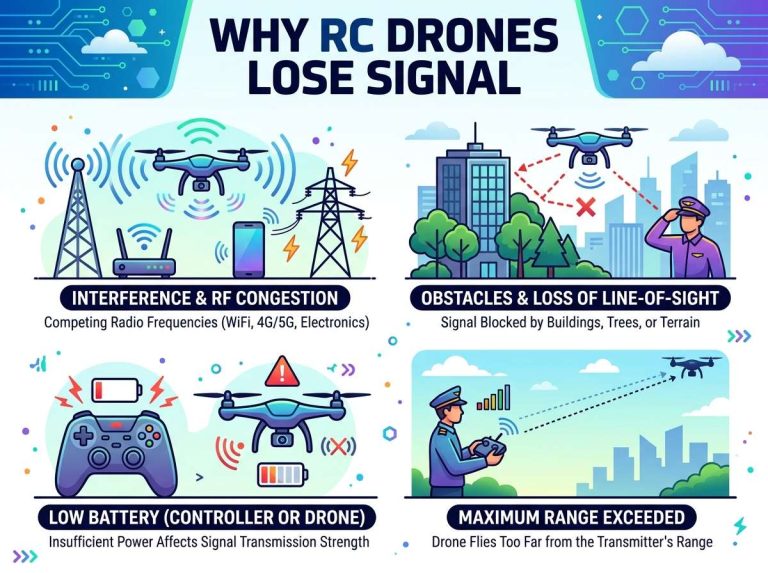
GPS signals are radio waves. Radio waves are powerful, but they can’t pass through solid objects very well. A thick forest can weaken the signal. Buildings and bridges block signals. Heavy rain can reduce signal strength. Even thick clouds cause some signal loss.
When you’re flying your RC drone indoors, GPS won’t work at all. The roof of your building blocks all the satellite signals. Your drone will lose GPS and fall back to other positioning methods.
Thick urban areas can be tricky too. Tall buildings surrounding your drone create something called the “urban canyon effect.” Signals bounce off the buildings. This causes errors in the location calculation. Your drone’s GPS might think it’s twenty feet to the left of where it actually is.
For best GPS accuracy, fly in open areas. Parks work great. Open fields are perfect. Beaches are excellent. Anywhere with a clear view of the sky gives your drone the best GPS signal.
Factor Two: The Number and Position of Satellites
As we talked about, more satellites equal better accuracy. But it’s not just about the number of satellites. The position of those satellites matters a lot.
If all your satellites are clustered in one part of the sky, the accuracy suffers. This is called a weak geometry. If the satellites are spread across different parts of the sky, you get something called strong geometry. Strong geometry gives you much better accuracy.
Your drone calculates something called DOP values. DOP stands for Dilution of Precision. These values tell you how accurate the GPS reading will be. Lower DOP numbers mean better accuracy. Higher DOP numbers mean worse accuracy.
You don’t need to worry too much about DOP numbers as a beginner. Just know that when your drone has a good GPS signal with multiple satellites spread across the sky, it will fly much more smoothly and accurately.
Factor Three: Atmospheric Conditions
The air itself can affect GPS signals. The ionosphere and troposphere both play roles in how the signal travels. When the sun is very active, it causes disturbances in the ionosphere. These disturbances can cause GPS errors that reach several meters.
Water vapor in the atmosphere also slows down GPS signals slightly. Humid days can mean slightly less accurate GPS than dry days. The difference isn’t huge for RC drones, but it does exist.
Seasonal changes affect GPS accuracy too. Different times of the year produce different levels of atmospheric interference. Again, this is subtle, but it’s part of the overall picture.
How Your Drone Actually Calculates Its Position
Now let’s get into the real mechanics. This is where GPS becomes fascinating.
Each satellite in orbit sends out a radio signal. This signal includes the exact time the signal was sent. It also includes information about the satellite’s orbit. The signal travels at the speed of light toward Earth.
Your drone’s GPS receiver picks up this signal. The receiver has its own clock. It checks the time the signal arrived and compares it to the time the signal was sent. The difference in time tells the receiver how far away the satellite is.
Here’s a simple example. Say a signal was sent at noon and arrived at 12:00:00.07. That’s seven-hundredths of a second later. The signal traveled at the speed of light, which is about 186,000 miles per second. Multiply that by 0.07 seconds, and you know the signal traveled about 13,000 miles. That means the satellite is about 13,000 miles away.
The receiver gets similar distance measurements from three other satellites. It now knows it’s roughly 13,000 miles from satellite A, 14,000 miles from satellite B, 12,500 miles from satellite C, and 13,200 miles from satellite D.
The receiver runs math equations to find the spot where all these distances intersect. That spot is the drone’s location. It works like finding the point where circles drawn on a map overlap.
Modern GPS receivers do this calculation constantly. They might update the location every second, or even ten times per second. This constant updating allows your drone to track its position smoothly as it moves through the air.
WAAS and RTK: Making GPS Even Better
Basic GPS is accurate to within about thirty feet. That’s pretty good. But some drone pilots want even better accuracy. That’s where WAAS and RTK come in.
WAAS stands for Wide Area Augmentation System. WAAS uses additional satellites to improve accuracy. It can get the error down to about ten feet. Some consumer drones have WAAS built in. It improves GPS performance without any extra equipment.
RTK stands for Real-Time Kinematic. RTK is much more advanced. It uses a ground station in addition to satellites. The ground station knows its exact location. It compares what the GPS says about its location to where it actually is. It calculates the error and sends a correction signal to the drone.
RTK can get accuracy down to just a few inches. Professional drones used for mapping and surveying often use RTK. It’s expensive though. Consumer RC drones usually don’t have RTK.
For most beginners flying for fun, regular GPS is more than enough. The thirty-foot accuracy is perfect for taking photos, exploring, and enjoying your drone.
What Happens When Your Drone Loses GPS Signal
Your drone doesn’t panic when it loses GPS. It has backup systems.
Modern drones typically use visual positioning in addition to GPS. Cameras on the bottom of the drone look at the ground. They track features and movement. This is called optical flow or visual odometry. It helps the drone hold its position even without GPS.
Drones also have accelerometers and gyroscopes. These sensors measure movement and rotation. They help the drone know what it’s doing even without GPS or cameras.
When you lose GPS signal, the drone falls back to these other systems. It can still fly and hold a position reasonably well. It just won’t be quite as stable or accurate as when GPS is working. The flight becomes less reliable the longer you fly without GPS.
Most pilots try to keep their drones in GPS mode whenever possible. The combination of all these systems working together gives the smoothest, most reliable flight.
How Return-to-Home Actually Works
One of the coolest GPS features is return-to-home. This is the feature that makes your heart skip a beat when your drone heads back automatically.
Here’s what happens. When you take off, your drone records the GPS coordinates of the takeoff point. This is called the home point. Your drone stores these coordinates in its memory.
If you press the return-to-home button, or if your drone loses signal with the controller, your drone pulls up those stored coordinates. It then flies toward that GPS location. It aims to arrive back at the exact spot where it took off.
Return-to-home is incredibly useful. If your drone flies far away and you lose visual contact, return-to-home brings it back. If your controller battery dies while you’re flying, return-to-home activates automatically. Many accidents are prevented because of this feature.
For return-to-home to work perfectly, you need a strong GPS signal. You need at least ten satellites locked on to your drone. The more satellites, the more accurate the return will be. This is why most pilots wait thirty seconds after turning on their drone before flying. This wait time allows the GPS receiver to lock onto enough satellites.
Return-to-home does have limits. If obstacles are in the way, the drone might crash into them. The drone doesn’t know about trees or buildings. It just flies straight toward the home point. It will climb up to avoid obstacles, but if a building is right in its path, it might hit it.
The GPS Compass: Navigation Made Simple
Your drone’s GPS receiver includes another useful tool: the GPS compass. The compass uses satellite movement to figure out which direction the drone is facing.
As your drone moves, it’s moving relative to the satellites. By tracking this movement over time, the receiver can figure out the drone’s heading. The heading is the direction the front of the drone is pointing.
The GPS compass is more reliable than a traditional magnetic compass. Magnetic compasses can get confused by power lines, metal structures, and other electromagnetic interference. The GPS compass doesn’t have these problems. It just uses satellite motion to determine direction.
Your drone uses this heading information to stay level and fly in straight lines. It helps with GPS-based flight modes where the drone holds a position or follows a path.
Flying in Different GPS Modes
Most RC drones have multiple GPS flight modes. Let’s talk about the common ones.
GPS Hold mode is the most basic. Your drone stays exactly where it is, even if wind pushes it. The GPS receiver constantly monitors the drone’s position. If it drifts even a few feet, the drone’s flight computer makes tiny adjustments to get back to the correct position. This mode is great for taking photos. You can point the camera where you want it and the drone will stay there.
GPS Follow Me mode is wild. Your drone follows you around. The drone knows where you are because your controller sends GPS signals, or the drone tracks a visual tag you’re wearing. The drone maintains a set distance behind you. As you walk or drive, the drone follows.
GPS Waypoint mode lets you program a path. You tell the drone to fly from point A to point B to point C. The drone uses GPS to navigate between these waypoints automatically. Some advanced drones can follow complicated paths with dozens of waypoints.
GPS Return mode, as we discussed, brings your drone home. Many drones trigger return-to-home if the signal is lost or if the battery gets low.
Each mode uses GPS differently, but they all rely on the same basic satellite positioning system.
Common GPS Problems and How to Fix Them
Even experienced drone pilots run into GPS issues sometimes. Here are the most common problems and how to solve them.
Problem: GPS takes forever to lock on
Your drone is sitting there and the GPS light is still blinking. It’s been two minutes. What’s going on?
This usually means the GPS receiver hasn’t locked onto enough satellites yet. Move to a more open area. Turn off your drone completely and wait a minute. Turn it back on. Sometimes the receiver gets stuck in a confused state. A full restart helps. Also check that you’re not in an area with lots of radio interference. Cell towers and power lines can cause problems.
Problem: GPS drifts during flight
Your drone is flying and you’re in GPS Hold mode, but it’s slowly drifting. The position isn’t rock solid.
This usually means you don’t have a strong satellite signal. Fly in a more open area away from trees and buildings. Make sure at least ten satellites are locked on. If you only have four or five satellites, the accuracy won’t be great.
Problem: Return-to-home flies into a tree
You pressed return-to-home and the drone flew directly into a tree instead of going around it.
The drone doesn’t have environmental awareness. It can’t see obstacles. It just flies toward the GPS coordinates. Always make sure the path between your drone and the home point is clear before pressing return-to-home. If trees or buildings are in the way, fly the drone manually to get around them, or press return-to-home in an area with clear skies.
Problem: GPS compass is acting crazy
The drone’s heading seems backward. It’s pointing north but the system says it’s pointing south.
This usually happens because you’re flying near something that interferes with the magnetic compass. Power lines, metal fences, and tall buildings can cause issues. Move to a different location. You can also try re-calibrating the compass. Check your drone’s manual for specific calibration steps.
Tips for Getting the Best GPS Performance
Want your drone to fly smooth as butter? Here are some practical tips.
First, always wait for GPS to lock before flying. Turn on your drone at least thirty seconds before you take off. Watch the GPS light. When it stops blinking and stays solid, you have enough satellites locked on.
Fly in open areas. Parks and fields are ideal. Avoid forests and urban canyons. The more sky your drone can see, the better the GPS signal.
Keep your drone updated. Manufacturers release firmware updates that improve GPS accuracy. Check the app regularly and install updates when available.
Avoid flying near tall structures. Skyscrapers and large buildings create weird reflections that confuse the GPS receiver.
Don’t fly in really bad weather. Heavy rain and storms weaken the signal. Fog isn’t usually a problem, but heavy clouds do reduce signal strength.
If you’re flying far away from home, make sure the home point is set correctly. Stand at your launch location, power on your drone, and wait for GPS lock. The home point is recorded automatically. Double-check that it’s set to your actual location before you fly far away.
The Future of Drone GPS
GPS technology is always improving. The original GPS system is getting upgrades. New satellite systems from other countries are coming online. These new systems offer even better coverage and accuracy.
Drones will likely use multiple satellite systems at the same time in the future. Instead of just GPS, drones might use GPS plus GLONASS plus Galileo plus BeiDou. Using multiple systems together will give incredible accuracy and reliability.
Augmentation systems like WAAS and RTK will become cheaper and more accessible. Consumer drones might start including RTK capability as the technology becomes more affordable.
Visual positioning and GPS will work together even better. Artificial intelligence might help drones understand obstacles and navigate around them automatically.
The technology is moving fast. What’s impossible for consumer drones today might be standard in a few generations.
The Bottom Line
GPS is the technology that makes modern RC drones possible. Without satellite positioning, drones couldn’t fly as stably or as safely. They couldn’t return home automatically. They couldn’t follow waypoints or track you automatically.
GPS receiver technology is getting smaller and more accurate every day. It’s also getting cheaper. This means better drones at better prices for everyone.
You don’t need to understand all the complex math behind GPS to be a great drone pilot. You just need to understand the basics. GPS needs a clear view of the sky. More satellites equal better accuracy. GPS receivers are incredibly clever. They use radio signals from satellites to figure out exactly where your drone is, multiple times per second.
The next time your drone smoothly holds position in the air, or returns home perfectly, or flies to a waypoint automatically, you’ll know what’s really happening. Invisible radio signals from space are constantly talking to your drone. Mathematical calculations are happening at lightning speed. All of it combines to create the amazing stability and automatic features that make flying an RC drone so much fun.
Flying with GPS feels almost magical. But now you know it’s just really smart technology doing exactly what it’s supposed to do.
Key Takeaways for Beginners
- GPS works by using signals from satellites orbiting Earth
- Your drone needs at least four satellites for accurate positioning
- Open sky gives the best GPS signal and accuracy
- Return-to-home is one of the coolest GPS features available
- GPS combined with other sensors makes your drone fly smoothly
- Waiting for GPS lock before flying prevents problems
- Multiple flight modes use GPS in different ways
- GPS accuracy is measured in feet, not inches, for consumer drones
- Environmental obstacles weaken the GPS signal
- The future of drone GPS includes even better systems and technology
Now you understand how RC drone GPS really works. Get out there and fly with confidence. Your satellite positioning system has your back.

Peterson is an RC hobby enthusiast and product reviewer with a passion for remote-controlled cars, trucks, boats, drones, and accessories. He enjoys testing the latest RC products, comparing features, and sharing practical buying guides to help beginners and experienced hobbyists make informed decisions. Through RCThing.com, Peterson provides honest reviews, maintenance tips, and expert advice to help readers get the most from their RC adventures.