5 Best FPV Drone for Beginners In 2026
If you type “best fpv drone for beginners” into Google, you already know one thing: there are way too many options and way too much confusing tech talk. Prop guards, VTX, goggles, flight modes, brushless motors… it can feel like a lot before you even get off the ground.
This guide cuts through all that noise. We looked at five popular beginner-friendly FPV drones that are actually worth your money right now, broke down what each one does well, where it falls short, and who it’s really built for. No hype, no fluff, just plain talk so you can pick the right drone the first time instead of returning three of them.
By the end of this article, you’ll know exactly which FPV drone fits your budget, your skill level, and your flying goals, from casual backyard fun to serious freestyle practice.
Let’s get into it.
Quick Answer: Our Top Picks at a Glance
- Best overall for total beginners: DJI Neo 2 Motion Fly More Combo
- Best for immersive freestyle flying: DJI Avata 2 Fly Smart Combo
- Best for learning true FPV piloting skills: CADDXFPV Protos FPV Drone RTF Kit
- Best for outdoor GPS-assisted flying with a screen controller: VUCDUSK GPS Drone with Camera
- Best budget FPV training kit: BETAFPV Cetus Pro FPV Kit
Now let’s break each one down properly.
Introduction: Why FPV Drones Are Different (and Why Beginners Love Them)
Regular camera drones show you the world from above, like a bird looking down. FPV, short for First Person View, puts you right in the cockpit. You strap on a pair of goggles, and suddenly you’re not watching the drone fly, you’re flying it, through gaps, around trees, close to the ground, at speed. It’s a completely different feeling, and once people try it, a lot of them get hooked fast.
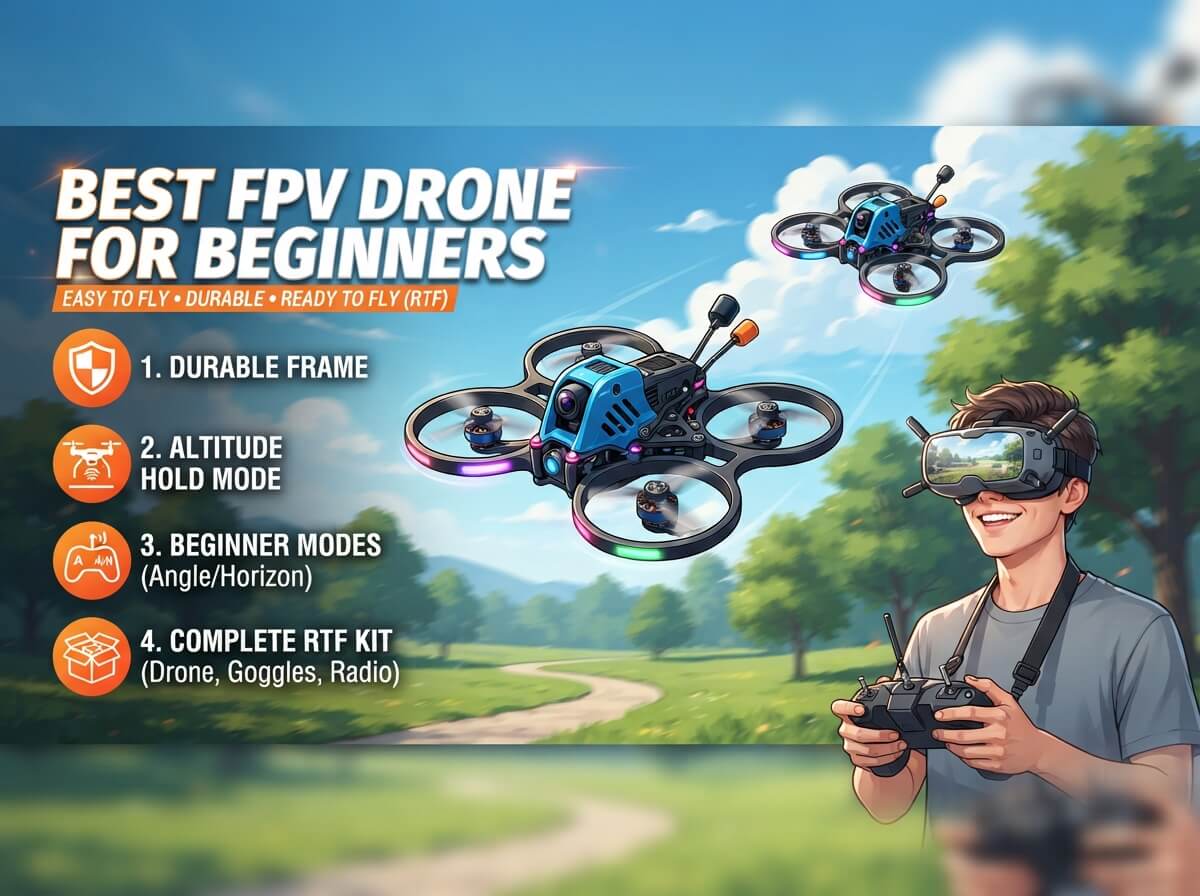
The tricky part is that FPV used to be a hobby only for tech-savvy hobbyists who built their own drones from scratch and learned to fly using a simulator for weeks before ever touching a real one. That’s changed a lot. Brands now make ready-to-fly kits with training wheels built right in, things like altitude hold, obstacle sensors, emergency landing, and beginner flight modes that slow everything down so you don’t crash on day one.
So if you’re new to this hobby, don’t worry. You don’t need to be a drone engineer. You just need the right kit, a bit of patience, and maybe an open field for your first few flights.
Below, we go through five FPV drones that are built with new pilots in mind. Each one takes a slightly different approach, so pay attention to the use cases because that’s really what separates them.
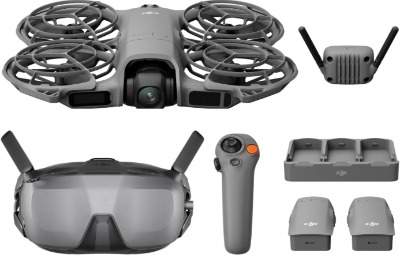
1. DJI Neo 2 Motion Fly More Combo (with RC Motion 3 and Goggles N3)
Product Description
The DJI Neo 2 is DJI’s small, palm-sized FPV-style drone, and this Fly More Combo throws in the RC Motion 3 controller, Goggles N3, and three batteries so you’re set up for a full day of flying right out of the box. It records in 4K and uses a digital transceiver for the video feed, which keeps the signal stable even when you’re a good distance away.
What makes this one stand out is how it’s built for people who have never flown anything before. It’s tiny, light, and comes with prop guards, so early mistakes don’t end in broken blades or holes in your wall.
Best Use Cases
- Learning basic FPV flight in a backyard or park
- Recording casual travel or lifestyle clips from a first-person angle
- Flying indoors in larger rooms or hallways thanks to its small size
- Gifting to a teenager or a first-time drone flyer
Key Features Explained Simply
Motion control (RC Motion 3): Instead of two joysticks, you tilt a small handheld controller to steer the drone, kind of like steering a toy car. It feels natural almost right away, even for someone who’s never touched a drone remote.
Digital transceiver: This is just a fancy way of saying the video signal going to your goggles stays clear and doesn’t glitch out as easily, even at a distance.
4K camera: You get sharp, clean footage, good enough for sharing online without looking grainy.
Prop guards: Built-in plastic rings around the propellers that protect the blades (and your fingers) during bumps and beginner mistakes.
Three batteries: More flight time per session without needing to stop and recharge constantly.
Real-Life Usage Insight
For someone who’s never flown FPV before, the Neo 2 feels less scary than a full-size racing drone. Because it’s light and guarded, small bumps into a wall or a tree branch usually don’t end the flight. New pilots tend to get comfortable with basic hovering and turning within the first couple of sessions, which builds confidence fast before moving on to anything more advanced.
Pros
- Very beginner-friendly motion controls
- Compact and travel-friendly
- Stable video transmission
- Comes with everything needed in one box
- Prop guards reduce damage from beginner mistakes
Cons
- Flight time per battery is on the shorter side compared to bigger drones
- Motion control takes a little getting used to if you’re expecting traditional stick controls
- Not built for serious freestyle tricks or racing
Performance Discussion
The camera holds up well in good lighting, and the digital signal rarely drops out during normal backyard flying. Wind resistance is decent for something this small, but strong gusts can push it around a bit, so calm days are best for beginners.
Ease of Use
This is one of the easiest FPV setups on this list to pick up. The motion controller removes the steep learning curve that usually comes with dual-stick flying.
Value for Money
Given that goggles, controller, drone, and three batteries all come in one combo, this is a solid deal for someone who wants a complete starter package without hunting down extra parts.
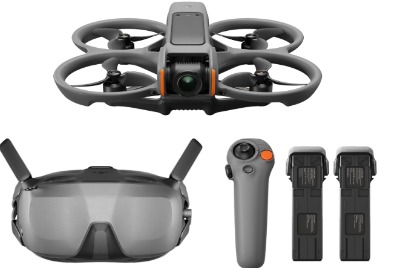
2. DJI Avata 2 Fly Smart Combo (Three Batteries)
Product Description
The Avata 2 is a step up from the Neo 2, built for people who want that true immersive FPV feeling with a bit more punch. It also comes with the Goggles N3 and RC Motion 3 in this combo, along with a built-in propeller guard for safer indoor and close-quarters flying. It records 4K video and is designed to feel exciting without being overwhelming for newer pilots.
Best Use Cases
- Flying through tight spaces like hallways, garages, or wooded trails
- Practicing smooth cinematic FPV shots
- Learning flips and rolls in a controlled, guarded way
- Stepping up from a smaller drone like the Neo 2
Key Features Explained Simply
Built-in propeller guard: A protective cage around the propellers that lets you bump into things, even people, without the blades causing damage. Great for learning in tighter spaces.
Easy flip and roll: A guided mode that lets you perform simple aerial tricks with one button press instead of needing advanced stick skills.
Goggles N3: These give you a wide, clear field of view so you feel like you’re actually sitting inside the drone as it moves.
RC Motion 3: Same tilt-to-steer system as the Neo 2, so if you’ve used that controller before, you’ll feel right at home.
Real-Life Usage Insight
New pilots often start with the easy flip and roll feature just to get a taste of what freestyle flying feels like, and it builds confidence quickly. The propeller guard also means you can fly closer to obstacles, trees, doorways, furniture, without constantly worrying about a crash ending your session.
Pros
- Immersive, exciting flying experience
- Propeller guard protects against everyday bumps
- Easy trick modes for beginners
- Strong 4K video quality
- Three batteries mean longer total flying time
Cons
- Bigger and heavier than the Neo 2, so it needs more open space
- Costs more than entry-level options
- Trick modes can feel gimmicky once you want full manual control
Performance Discussion
Flight stability is strong even at higher speeds, and the digital video link stays sharp across decent distances. This drone handles wind a bit better than the smaller Neo 2, thanks to its size and weight.
Ease of Use
Still beginner-friendly thanks to motion controls, but it does fly faster and feels a bit more responsive, so first-timers should start in a calm, open area.
Value for Money
For the immersive experience and build quality you get, this combo earns its price tag, especially for someone planning to grow into more advanced flying later on.
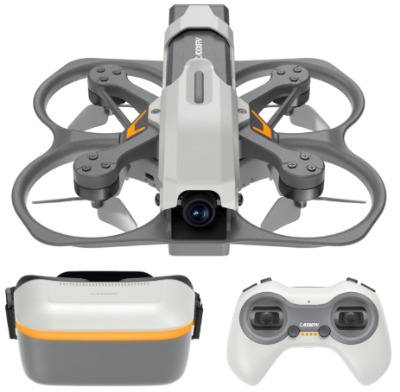
3. CADDXFPV Protos FPV Drone RTF Kit
Product Description
This kit takes a more traditional FPV approach compared to the DJI options above. It comes ready to fly with a Walksnail Ascent VTX (video transmitter) system, proper FPV goggles, and records in 1080P at 60 frames per second. It also includes three flight modes and a smart hover feature, which is a big deal for anyone learning real stick-based FPV flying instead of motion controls.
Best Use Cases
- Learning traditional dual-stick FPV flying
- Practicing indoors with smart hover before flying outdoors
- Progressing toward freestyle or acro flying down the road
- Getting familiar with real FPV goggles and analog-style piloting habits
Key Features Explained Simply
Walksnail Ascent VTX: This is the video transmission tech that sends the live camera feed to your goggles. It’s known in the FPV community for being clear and reliable, similar to digital systems used in higher-end setups.
3 flight modes: These usually range from a beginner-friendly stabilized mode all the way to a more advanced mode for sharper, faster control once you’re ready.
Smart hover: The drone can hold its position in the air on its own, which is huge for beginners because it gives you breathing room to figure out the controls without constantly correcting for drift.
4.5-inch FPV goggles: Big enough screen inside to feel properly immersive without being overly bulky.
3-battery charging hub: Lets you charge multiple batteries together instead of one at a time, saving a good chunk of downtime between flights.
Real-Life Usage Insight
This kit works well as a bridge between casual flying and real FPV piloting. Because it uses proper sticks instead of motion control, the learning curve is a bit steeper at first, but pilots usually get the hang of hovering and gentle turns within a handful of sessions, especially with smart hover turned on during early practice.
Pros
- Real stick-based flying experience, useful for future skill building
- Smart hover makes early practice much less stressful
- Reliable video transmission
- Charging hub saves time between sessions
- Great stepping stone toward full manual FPV flying
Cons
- 1080P video isn’t as sharp as the 4K options on this list
- Traditional stick controls take longer to learn than motion controls
- Slightly more setup involved compared to plug-and-play combos
Performance Discussion
Flight feels responsive once you get comfortable with the sticks, and the beginner mode keeps things forgiving. Smart hover genuinely helps reduce those early “oh no” moments where the drone drifts off unexpectedly.
Ease of Use
Not quite as instantly easy as motion-controlled drones, but the smart hover and beginner flight mode do a lot of heavy lifting to soften the learning curve.
Value for Money
For anyone serious about learning actual FPV piloting rather than just trying it once, this kit offers strong value, since it teaches skills that carry over to bigger, faster drones later.
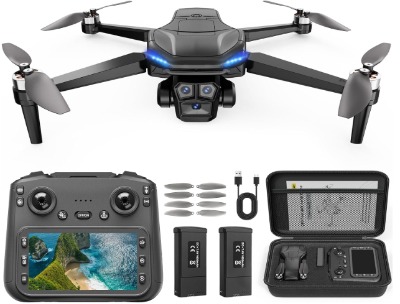
4. VUCDUSK GPS Drone with Camera for Adults (4.5″ FPV Screen Controller)
Product Description
This one is a bit different from the others on this list. Instead of goggles, it uses a 4.5-inch screen built right into the controller, so you see the live feed without putting anything over your eyes. It’s a foldable quadcopter with a brushless motor, GPS-based auto return, follow-me mode, three speed settings, and up to 60 minutes of flight time across its batteries. It also comes in under 249 grams, which matters in a few places for registration rules.
Best Use Cases
- Outdoor flying for photos and video without wearing goggles
- Beginners who want GPS safety features like auto return
- Travel, hiking, or family trips where a foldable design helps with packing
- Anyone who prefers watching a screen instead of goggles strapped to their face
Key Features Explained Simply
GPS auto return: If the drone loses signal, runs low on battery, or you just hit the return button, it flies back to its takeoff spot on its own. This is a huge safety net for new pilots worried about losing their drone.
Follow me mode: The drone tracks and follows a chosen subject, handy for hands-free video while biking, walking, or doing outdoor activities.
Brushless motor: These motors last longer and run more efficiently than the cheaper brushed motors found in toy-grade drones, meaning better performance and durability over time.
Foldable design: The arms fold in, so it packs down small enough to fit in a bag or backpack.
Under 249g weight: In many regions, drones under this weight face fewer registration requirements, which simplifies things for casual flyers.
Real-Life Usage Insight
Because it relies on a screen rather than goggles, this drone suits people who get a bit uneasy with the fully immersive FPV goggle experience or just prefer to see their surroundings while flying. The GPS return feature also gives a lot of peace of mind on windy days or when flying near tree lines, since the drone can find its way back on its own.
Pros
- No goggles needed, easier for some people to get used to
- GPS auto return adds a strong safety net
- Long flight time keeps sessions going
- Foldable and lightweight for travel
- Follow-me mode is great for casual video content
Cons
- Doesn’t offer the same true immersive FPV feeling as goggle-based drones
- Video quality, while solid, isn’t quite in the same league as the DJI options
- GPS features work best outdoors with clear satellite signal, less reliable indoors
Performance Discussion
Flight stability outdoors is strong thanks to GPS positioning, and it holds its position well even with a light breeze. Indoors or in GPS-poor areas, it behaves more like a standard camera drone rather than a smart, self-correcting one.
Ease of Use
This is one of the more approachable options here, especially for anyone who finds goggles disorienting. The screen controller feels familiar, almost like using a handheld gaming device.
Value for Money
With GPS safety features, decent flight time, and a foldable travel-friendly build, this drone offers solid value for people who want camera drone convenience with a bit of FPV flavor.
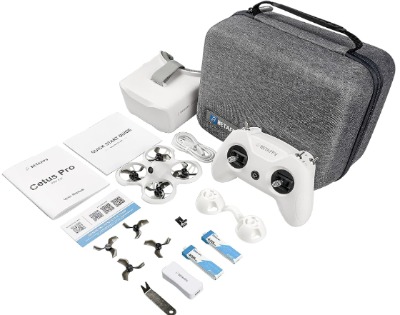
5. BETAFPV Cetus Pro FPV Kit (with LiteRadio 2 SE and VR02 Goggles)
Product Description
The Cetus Pro is widely known in the FPV community as one of the best starter kits for people who want to learn real FPV flying the proper way, sticks, goggles, and all, without spending a fortune. It comes with the LiteRadio 2 SE transmitter and VR02 FPV goggles, plus safety features like altitude hold, emergency landing, and self-protection to keep early flights from ending badly.
Best Use Cases
- First-time FPV pilots on a budget
- Practicing indoors thanks to its small, protected frame
- Learning on a simulator before or alongside real flights
- Anyone who wants to eventually build or fly bigger freestyle or racing drones
Key Features Explained Simply
Altitude hold: The drone keeps a steady height on its own, so you’re not fighting to keep it level while also learning left, right, forward, and back.
Emergency landing: A quick way to bring the drone down safely if things start going wrong mid-flight, reducing crash damage.
Self-protection: Built-in frame guards that shield the propellers during bumps, which matters a lot when you’re still learning basic control.
Simulator support: You can connect the controller to your computer and practice flying in a simulator before ever taking the real drone outside. This is one of the smartest ways to learn FPV without breaking anything.
Mode 2 controls: This refers to the standard stick layout most FPV and RC pilots use, throttle on the left stick, and pitch and roll on the right.
Real-Life Usage Insight
A lot of people in the FPV hobby actually recommend starting with something like the Cetus Pro specifically because of the simulator support. New pilots can spend time crashing (virtually) in the simulator first, building muscle memory, before ever risking the real drone. Combined with altitude hold and self-protection, this kit tends to survive the rough first few weeks of learning much better than more fragile beginner drones.
Pros
- Genuinely beginner-focused with real safety nets built in
- Simulator support speeds up learning without risk
- Affordable compared to the DJI options here
- Frame guards reduce crash damage significantly
- Great entry point into the wider FPV hobby, including future freestyle builds
Cons
- Video quality is noticeably lower than the DJI or Walksnail systems above
- Smaller flight range compared to higher-end kits
- Less refined “premium” feel compared to DJI combos
Performance Discussion
Flight feels light and forgiving thanks to altitude hold, and the frame does a good job surviving small crashes, which happen a lot in the beginning. The video feed is functional and clear enough for line-of-sight practice, even if it’s not going to wow anyone with sharpness.
Ease of Use
Between altitude hold, emergency landing, and simulator practice, this kit removes a lot of the stress that usually comes with stick-based FPV flying.
Value for Money
This is easily one of the most budget-friendly ways to properly learn FPV flying with real goggles and sticks, without needing to spend DJI-level money right out of the gate.
Comparison Insights: How These Five Stack Up
Here’s a simple side-by-side to help things click.
| Drone | Control Type | Video Quality | Best For | Price Tier |
|---|---|---|---|---|
| DJI Neo 2 Motion Combo | Motion control | 4K | Total beginners, travel | Mid |
| DJI Avata 2 Smart Combo | Motion control | 4K | Immersive freestyle fun | Higher |
| CADDXFPV Protos RTF Kit | Dual sticks | 1080P/60FPS | Learning real FPV piloting | Mid |
| VUCDUSK GPS Drone | Screen controller | 4K | Outdoor safety, no goggles | Mid |
| BETAFPV Cetus Pro | Dual sticks | Lower-res FPV feed | Budget FPV learning + simulator | Budget |
A few patterns stand out here. If you want the easiest possible entry point with minimal learning curve, motion control drones like the Neo 2 and Avata 2 win, hands down. If you actually want to learn traditional FPV flying (the kind used in racing and freestyle), the Protos kit and Cetus Pro are the better long-term investment, since they teach real stick skills from day one.
The VUCDUSK drone stands apart because it skips goggles altogether, which works great for people who find FPV goggles a bit disorienting or claustrophobic at first, or who just want GPS safety nets like auto return.
Budget also plays a big role. The Cetus Pro is clearly the most wallet-friendly way into this hobby, while the Avata 2 sits at the premium end thanks to its build quality, immersive feel, and trick modes.
Buying Guide: What to Actually Look For
Before you buy any FPV drone, run through these points. They matter far more than flashy marketing photos.
1. Controller type Motion controllers (tilt-to-steer) are easier for total beginners. Dual-stick controllers take longer to learn but give you more precise, long-term control, and they’re the standard if you ever want to fly racing or freestyle drones seriously.
2. Goggles vs screen Goggles give you the full immersive FPV feeling, like you’re sitting inside the drone. Screens are less intense and easier for people who feel dizzy or overwhelmed by goggles.
3. Flight time and batteries Look at how many batteries come in the box, not just the flight time per battery. Three batteries mean roughly three times the flying per outing before you need to recharge.
4. Safety features Altitude hold, emergency landing, GPS auto return, and prop guards are not just nice extras for beginners, they’re what keeps your first few weeks from turning into a pile of broken parts.
5. Video quality 4K looks great for sharing clips online, but if you’re mainly learning to fly rather than filming content, 1080P at a smooth frame rate is perfectly fine and often even easier on the eyes through goggles.
6. Simulator support If a kit lets you practice on a computer simulator first, use it. It’s the single best way to learn stick-based FPV control without risking real hardware.
7. Size and weight rules Drones under a certain weight often face fewer legal registration requirements in many places. Always check your local rules before flying, especially around airports, crowds, or protected areas.
Who Should Buy Which Drone
- A total newcomer who’s never flown anything: Go with the DJI Neo 2. It’s small, guarded, and the motion controller removes most of the guesswork.
- Someone who wants the “wow” immersive feeling right away: The DJI Avata 2 delivers that rush while still keeping training wheels on with easy trick modes.
- A future freestyle or racing pilot: Start with the CADDXFPV Protos or the BETAFPV Cetus Pro. Both teach real stick skills that carry over as you upgrade later.
- Someone nervous about goggles or wanting GPS safety nets: The VUCDUSK GPS drone with its screen controller and auto return feature is the more relaxed option.
- Anyone on a tighter budget: The Cetus Pro gives you real FPV goggles, sticks, and simulator support without the premium DJI price tag.
Common Mistakes Beginners Make (and How to Avoid Them)
Flying in tight or crowded spaces too early. Even beginner-friendly drones need room to breathe. Start in an open field or large empty room, not your living room full of furniture.
Skipping the simulator. If your kit supports simulator practice, use it before flying outdoors. It costs nothing but time and saves you from early crashes.
Ignoring battery care. FPV batteries don’t like being left fully drained or overcharged for long periods. Charge them properly and store them at a partial charge if you’re not flying for a while.
Flying in windy conditions as a beginner. Small, light drones especially get pushed around easily. Wait for a calm day for your first several flights.
Not checking local drone laws. Registration rules, no-fly zones, and altitude limits vary by location. A quick check before your first flight saves a lot of headaches later.
Going straight for advanced flight modes. It’s tempting to unlock every trick and speed setting immediately, but starting slow in beginner mode builds the muscle memory you’ll need before flying fast or doing flips.
Forgetting propeller guards during early practice. Even if a drone doesn’t come with them built in, aftermarket guards are cheap and can save you from cracked blades during the learning phase.
Final Verdict
There’s no single “best” FPV drone for every single beginner, because it really depends on what kind of flying experience you’re after.
If you want the smoothest, least intimidating way into FPV flying, the DJI Neo 2 Motion Fly More Combo is hard to beat. It’s small, forgiving, and the motion controller makes it feel almost effortless from your very first flight.
If you’re chasing that true immersive rush and don’t mind spending a bit more, the DJI Avata 2 delivers a genuinely exciting flying experience while still keeping beginner-friendly features in place.
For anyone who actually wants to learn real FPV piloting, the kind used in freestyle and racing, the CADDXFPV Protos and BETAFPV Cetus Pro are the smarter long-term picks. They teach proper stick control from the start, and the Cetus Pro in particular is a fantastic budget-friendly gateway into the hobby thanks to its simulator support.
And if goggles just aren’t your thing, or you want strong GPS safety nets like auto return and follow-me mode, the VUCDUSK GPS Drone offers a comfortable middle ground between a regular camera drone and full FPV flying.
Take a moment to think about your budget, how much space you have to fly, and pick between the full immersive goggle experience or a simpler screen-based setup. Get that part right, and any of these five FPV drones will give you a fun, low-stress way into one of the most exciting hobbies out there right now.
Happy flying, and take it slow at first, every experienced FPV pilot crashed a lot in their first few weeks too.
Peterson is an RC hobby enthusiast and product reviewer with a passion for remote-controlled cars, trucks, boats, drones, and accessories. He enjoys testing the latest RC products, comparing features, and sharing practical buying guides to help beginners and experienced hobbyists make informed decisions. Through RCThing.com, Peterson provides honest reviews, maintenance tips, and expert advice to help readers get the most from their RC adventures.