How RC Car Steering System Works?
If you just picked up your first remote control car, you might be wondering how those tiny wheels actually know which way to turn. The steering system in an RC car might look simple from the outside, but it’s actually a clever combination of mechanics and electronics working together. This guide will walk you through everything you need to know about RC car steering.
What Is an RC Car Steering System?
Think of the steering system as the brain that controls where your RC car goes. When you move the joystick or trigger on your remote control, signals travel to the receiver in the car. These signals then tell the steering servo to move the front wheels left or right.
The steering system doesn’t just make your car turn. It also controls how quickly the wheels respond, how far they can turn, and how smooth or sharp your turns feel. Everything works together to give you control over your tiny vehicle.
The Main Parts of an RC Car Steering System
Your RC car steering system has several key parts. Let’s break down what each one does.
The Servo Motor
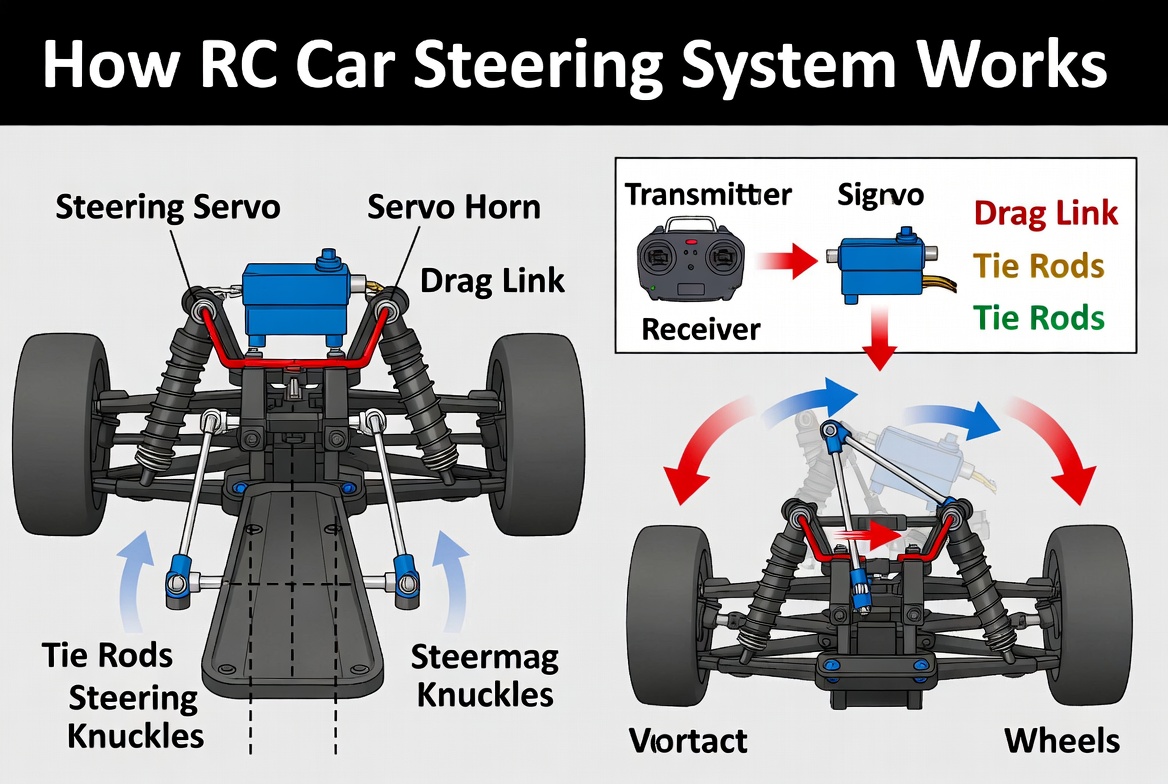
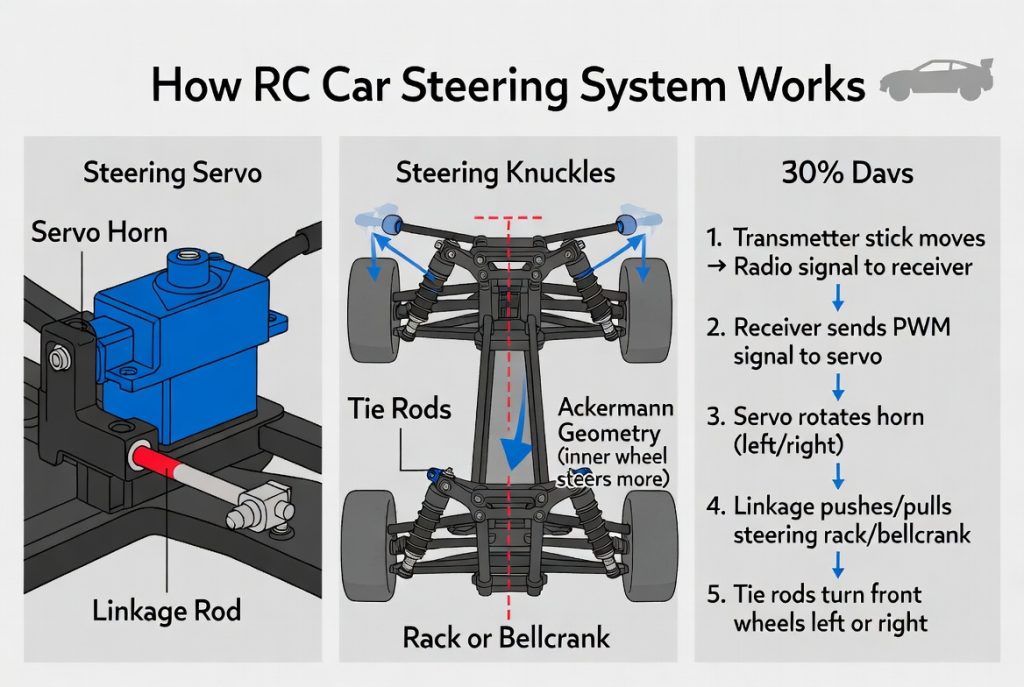
The servo motor is the heart of your RC car’s steering. This small motor does the heavy lifting. When your remote control sends a signal, the servo motor receives it and rotates. This rotation moves the steering arm, which then pushes or pulls the tie rods that connect to your front wheels.
Servo motors are super accurate. They don’t just spin all the way around like regular motors. Instead, they move to exact positions and hold them steady. This precision is what makes your RC car steering feel responsive and reliable.
Most RC cars use standard servo motors. These come in different sizes and power levels. A stronger servo can turn heavier vehicles or move faster steering components. A weaker servo works fine for lighter cars.
The Steering Linkage
The steering linkage is the system of rods and connectors that transfers movement from the servo motor to your wheels. Think of it like the steering in your real car. When you turn the steering wheel, it moves rods and joints that eventually turn your real car’s wheels.
In an RC car, the linkage does the same job but on a tiny scale. The servo arm connects to a main tie rod. This tie rod runs forward and connects to the steering knuckles on both front wheels. When the servo arm moves, it pulls or pushes this linkage, making the wheels turn.
The linkage usually has several small metal rods and plastic connectors. These parts allow the wheels to move smoothly while keeping everything aligned. If any part of the linkage gets bent or loose, your steering will feel sloppy or unresponsive.
The Steering Knuckles
Steering knuckles are the parts that hold your front wheels. They pivot at the top and bottom, allowing the wheels to turn left and right. When the steering linkage pulls or pushes, the knuckles rotate around these pivot points.
The knuckles also hold the wheel bearings. These bearings let the wheels spin smoothly while the knuckles can turn. Everything has to work together perfectly for your steering to feel tight and responsive.
The Tie Rods
Tie rods are the metal or carbon rods that connect your steering components. You’ll usually find at least two tie rods on an RC car. One connects the servo output arm to a center steering arm. Another might connect from that center arm out to both wheel knuckles.
Some RC cars use more complex linkage systems with three or four tie rods. More tie rods can give you more steering control and stability, but they also add complexity and weight.
The Front Axle Assembly
The front axle assembly holds everything together. It includes the steering knuckles, the tie rod ends, and the suspension mounts. All these parts work as one unit to allow your wheels to turn and move up and down with bumps.
The front axle has to be strong enough to handle impacts and turns. If it bends or breaks, your whole steering system will be out of alignment.
How Steering Commands Travel from Remote to Car
The journey from your remote control to your RC car’s steering happens in milliseconds. Here’s how it works:
You push your joystick or trigger on the remote control. This creates an electrical signal. The remote’s transmitter takes this signal and broadcasts it as a radio wave. Your RC car has a receiver that picks up this radio signal.
The receiver translates the signal into a command. This command tells the servo motor exactly how far to move. The servo then rotates to that position and holds it steady.
As long as you keep the joystick in that position, the servo stays there. When you release the joystick back to center, the servo returns to neutral, and your car goes straight.
The whole process happens incredibly fast. Most modern RC car systems update 50 to 100 times per second. This fast response rate makes steering feel smooth and natural.
Servo Motors Explained in Detail
Since servo motors do all the work in steering, let’s talk more about how they work.
What Makes a Servo Different from a Regular Motor
A regular electric motor spins continuously as long as power is applied. A servo motor is different. It has internal gears, a potentiometer (a position sensor), and a control circuit all built in.
The control circuit constantly compares where the servo should be (based on your remote control input) with where it actually is (based on the potentiometer reading). If there’s any difference, the servo adjusts itself to match the target position.
This feedback system makes servo motors incredibly accurate. They can hold a position against resistance. This is why your RC car’s steering doesn’t drift when you turn.
Understanding Servo Specifications
When you buy a servo, you’ll see several numbers that describe how it works. These specs tell you if a servo is right for your car.
Torque measures how much rotational force the servo has. Higher torque means the servo can turn the wheels faster and overcome more resistance. A servo with 3 kg-cm of torque is weaker than one with 5 kg-cm. Heavy cars or aggressive racing needs higher torque servos.
Speed tells you how fast the servo can rotate from one position to another. Speed is usually measured in seconds per 60 degrees. A servo that moves in 0.12 seconds is faster than one that takes 0.20 seconds. Faster servos feel more responsive.
Voltage matters too. Most RC servos run on 4.8 to 6 volts. Some high-performance servos can run on higher voltage for better speed and torque. Check your car’s power system to see what voltage you can use.
Deadband is the range where the servo doesn’t move. A servo with a tight deadband means tiny joystick movements cause steering response. A wide deadband means you have to move the joystick more before anything happens.
Types of Servo Technologies
Analog servos are the basic type. They’re affordable and reliable. An analog servo moves to the commanded position and holds it. These work great for casual drivers and beginners.
Digital servos use microprocessors to control movement. They update their position more frequently, making them faster and more precise. Digital servos also hold their position more firmly against external forces. They cost more than analog servos but feel noticeably better.
Brushless servos use brushless motors inside instead of brushed motors. They’re even faster and more powerful than digital servos. Racing enthusiasts use brushless servos for competitive driving. They’re the most expensive option.
Steering Geometry and How It Affects Handling
The way your RC car’s steering is set up affects how it handles turns. Engineers use something called steering geometry to dial in the perfect feel.
Ackermann Steering Geometry
Real cars use something called Ackermann steering geometry. This means the inside wheel turns more than the outside wheel during a turn. This helps the car turn smoothly without fighting itself.
Many RC cars try to copy this geometry. When you turn your RC car, the inside front wheel should actually turn more than the outside wheel. This happens because of how the tie rods are angled and connected.
Getting Ackermann geometry right makes your RC car feel more natural. It corners better and uses less battery power because the steering isn’t fighting against the car’s movement.
Steering Trim and Centering
Your remote control has a trim button for steering. This lets you adjust the neutral point where your front wheels point straight ahead. If your car always drifts left or right when you’re not touching the joystick, you need to adjust the trim.
Most modern RC cars also have a one-way bearing system or centering spring that helps the steering return to center. This makes driving feel more natural.
Steering Expo and Sensitivity
Steering expo is a setting on your remote that controls how the steering response changes at different joystick positions. With low expo, tiny joystick movements cause big steering changes. With high expo, you can make small movements without huge steering response.
Most experienced drivers use some expo to make steering feel smoother. High-speed racing setups often use more expo. Bashing around in open areas often uses less expo.
Common Steering Issues and How to Fix Them
Even simple steering systems can develop problems. Here are the most common issues you’ll run into.
Loose or Sloppy Steering
If your steering feels loose or delayed, something is probably loose in your linkage. Check all the tie rod ends. Make sure they’re tight but not over-tightened. Look for any cracks in plastic connector pieces.
A loose servo horn (the arm that connects to the tie rod) is also common. Tighten the screw holding it to the servo shaft. If it keeps loosening, you might need to replace it.
Bent tie rods can also cause slop. Pull the car up on a jack and look at your steering linkage from above. Bent rods need replacement.
Steering That Won’t Center
If your car doesn’t go straight when you release the joystick, your servo might not be centering correctly. First, check the trim on your remote. Use the steering trim to make fine adjustments.
If the trim doesn’t fix it, your servo might need recalibration. Bind your receiver to your transmitter again. This resets all the servo positions to factory defaults.
Worn out servo gears might also cause centering problems. If your servo is old and gets used hard, internal gears can wear out. You’ll need to replace the servo.
Steering That’s Too Fast or Too Slow
Speed problems usually come from servo choice or settings. If steering is too slow, you might need a faster servo with better specifications. If it’s too fast, try adjusting the expo on your remote.
You can also change how much the servo rotates. Most servos can be adjusted so they don’t move through their full range. A servo that moves less will feel slower. Adjust the servo throw in your remote’s settings.
Uneven Steering
If turning left feels different from turning right, your linkage might not be symmetrical. Check that both tie rods are the same length. Measure them carefully. Even a small difference can cause uneven steering.
Also check your wheel alignment. If the front wheels aren’t pointing the same direction at rest, steering will feel uneven.
Upgrading Your Steering System
Once you understand how steering works, you might want to upgrade. Here’s what typically improves steering performance.
Better Servos
Swapping to a faster or more powerful servo is the easiest upgrade. You’ll notice immediate improvement in steering response. Digital or brushless servos feel noticeably better than basic analog servos.
Make sure the servo fits your car and works with your battery voltage. Most RC cars accept standard-sized servos, but some ultra-compact cars need micro servos.
Aluminum Parts
Replacing plastic tie rods and connectors with aluminum parts reduces flex. This makes steering feel tighter and more precise. Aluminum also lasts longer and handles crashes better than plastic.
You’ll pay more for aluminum parts, but they’re worth it if you drive hard or race competitively.
Adjustable Linkage
Some advanced RC cars have adjustable steering linkage. You can change tie rod lengths and angles to fine-tune how the car handles. This takes some knowledge, but it gives you way more control over steering feel.
Multiple Servo Setup
Some high-end RC cars use two steering servos instead of one. Each servo controls one front wheel independently. This system gives incredible steering precision. It’s overkill for casual driving but great for competitive racing.
Steering Different Types of RC Cars
Different RC car classes need different steering setups.
On-Road Racing Cars
On-road cars run on smooth pavement. They need precise, responsive steering. They typically use high-speed digital or brushless servos. The steering linkage is usually very tight with minimal play.
These cars often use very small steering angles. The servo doesn’t move through a huge range. This gives rapid steering response for high-speed corner entry.
Off-Road Buggies
Off-road buggies bash through rough terrain. They need steering that can handle big impacts and loose surfaces. These cars usually have stronger servos that can fight through sand and dirt.
Off-road steering geometry is often more aggressive than on-road. The front wheels can turn through a bigger range of motion. This helps with climbing obstacles and navigating tight trails.
Rock Crawlers
Rock crawlers are super slow precision vehicles. They use standard-power servos with lots of steering angle. The driver needs fine control to pick their way over rocks and obstacles.
These cars often have low-speed steering response. The servo moves slowly through its full range. This gives the driver maximum control at walking speeds.
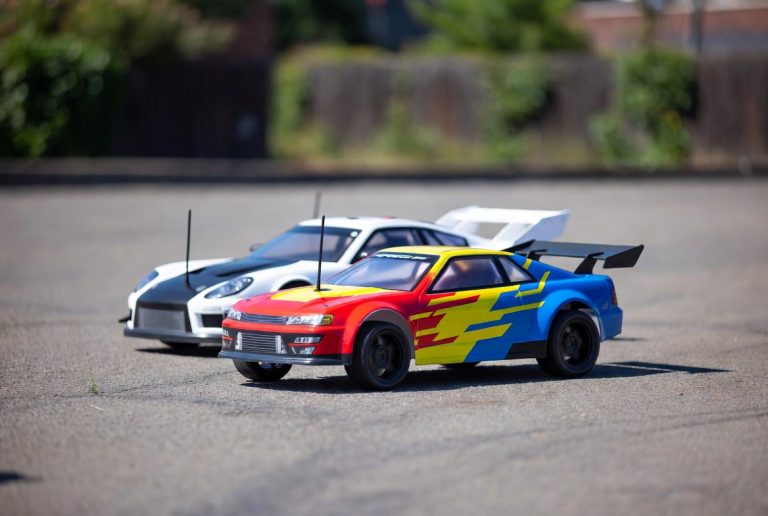
Drifting Cars
RC drift cars have special steering requirements. They use high-speed servos with Ackermann geometry to handle high-speed slides. The steering response is often set up to feel a bit loose so the driver can make quick corrections.
Many drift cars use modified steering geometry compared to stock setups. This helps the car slide and recover smoothly.
The Electronics Behind Steering
Your RC car’s steering system is controlled by modern electronics. Let’s understand the basics.
The Receiver
The receiver picks up the radio signal from your transmitter. It has an antenna and a microprocessor inside. The receiver translates the steering commands and sends them to the servo.
Modern receivers are incredibly small. They’re about the size of a USB thumb drive. Despite their tiny size, they’re extremely reliable and responsive.
The Steering Channel
Your receiver has multiple channels. The steering channel is usually Channel 1. This channel receives steering commands from your transmitter.
You can usually program how the steering channel responds. You can reverse it if the wheels turn the wrong way. You can adjust the servo throw to control how far the wheels move.
Signal Calibration
When you first use a new receiver and servo together, you need to calibrate them. This is called binding. During binding, the servo learns the full range of motion for that receiver.
Binding is usually super easy. You hold a button on the receiver while you move the joystick through its full range. The servo learns where center and full left and right are.
Advanced Steering Concepts
If you really want to get into the details, here are some advanced steering ideas.
Servo Saver
A servo saver is a special connector between the servo horn and the tie rod. It’s designed to break free under extreme force. This protects your servo from damage when the car crashes.
Instead of snapping the servo shaft or gears, the servo saver connector lets go. You just pop it back together. It’s a cheap insurance policy for your expensive servo.
Steering Deadband and Linearity
Deadband is the amount of joystick movement that happens before the servo responds. Some drivers like a tight deadband (quick response). Others prefer a wider deadband (more stable).
Linearity controls how the steering response changes as you move the joystick. With linear steering, moving the joystick halfway gives you half steering. Non-linear steering might give you less response at the center and more at the extremes.
Programmed Steering Curves
Advanced transmitters let you program custom steering curves. You can make steering respond differently at various joystick positions. This gives you complete control over how the car feels.
A good steering curve makes your car feel natural and responsive at the speeds you actually drive at. You might want different curves for racing versus casual driving.
Maintenance Tips for Your Steering System
Keeping your steering system working great is mostly about regular maintenance.
Keep It Clean
After every drive session, brush off dirt and grass from your steering linkage. Use a small brush or compressed air. Dirt can get into joints and cause them to wear faster.
If you drove in mud or water, rinse the steering components with fresh water and let them dry completely.
Check Tightness Regularly
Once a month, grab your car and try to wiggle each tie rod and connector. Everything should be super tight with no movement. Tighten anything that moves.
Pay special attention to the servo horn. This is where crashes happen first. Make sure it’s always tight.
Inspect for Damage
Look for cracks in plastic parts or bends in metal parts. Stress cracks in connector pieces often spread quickly. Replace them before they fail completely.
Check for play in your servo. If you grab the servo horn and can wiggle it, the servo bearings are worn. A servo with worn bearings doesn’t steer accurately.
Lubricate Smartly
A tiny bit of light silicone grease on servo output bearings and ball joints keeps them smooth. Don’t overdo it. Too much grease attracts dirt.
Don’t use heavy oils or greases. They’re too thick and make steering sluggish.
Replace Worn Parts Quickly
Steering parts take a lot of stress. They wear out over time. The moment you feel your steering getting sloppy, figure out which part is loose or worn. Replace it quickly before it affects your driving.
Troubleshooting Your Steering Problems
If something feels wrong with your steering, here’s how to figure out what’s happening.
Steering feels delayed or sluggish: Check your servo speed. You might need a faster servo. Also check that all linkage points are tight.
Steering is jumpy or jerky: Your servo might have a problem. Try calibrating the receiver and servo again. Jerky steering can also mean your servo is damaged.
One direction steers better than the other: Check your wheel alignment. Look for bent tie rods. Make sure your servo horn is straight.
Steering drifts in one direction: Use your remote’s trim button to adjust. If trim doesn’t fix it, check for bent parts or internal servo problems.
Steering won’t reach full lock: Your servo might not be moving through its full range. Check your servo throw settings. You might need to adjust how far the servo rotates.
Steering is too sensitive: Reduce your steering expo. You can also reduce servo throw so it doesn’t move as far.
Steering doesn’t respond quickly enough: Increase your steering expo. Get a faster servo. Check that all linkage is tight and smooth.
Final Thoughts on RC Car Steering
The steering system in an RC car is a perfect example of how engineers combine mechanics and electronics to create something that works beautifully. Every part plays a role. Every adjustment affects how your car feels.
When you understand how these systems work, you can make smart choices about your car. You know what upgrades will actually help. You can troubleshoot problems instead of getting frustrated.
The best part is that steering systems are pretty straightforward once you learn the basics. A beginner can understand RC car steering in just one afternoon. You don’t need to be a mechanic or engineer.
Start with stock components and keep your steering system clean and tight. Pay attention to how your car feels. When you’re ready to upgrade, you’ll know exactly what you want to improve.
Your RC car’s steering system is there to give you the best driving experience. Take care of it, understand how it works, and you’ll enjoy years of precise, responsive driving. Whether you’re racing, bashing, crawling rocks, or drifting, a well-tuned steering system makes all the difference in how much fun you have.
Get out there and enjoy your RC car. Now that you know how the steering works, you’ll appreciate every smooth turn and quick response.
Peterson is an RC hobby enthusiast and product reviewer with a passion for remote-controlled cars, trucks, boats, drones, and accessories. He enjoys testing the latest RC products, comparing features, and sharing practical buying guides to help beginners and experienced hobbyists make informed decisions. Through RCThing.com, Peterson provides honest reviews, maintenance tips, and expert advice to help readers get the most from their RC adventures.