Why RC Car Steering Is Not Working?
Your RC car flies down the track or tears through the dirt, but then the front wheels lock up. You yank the steering wheel on your remote, and nothing happens. The car just keeps barreling straight ahead. This problem hits every RC fan sooner or later. You feel that rush of frustration when your favorite hobby machine stops listening.
The good news? You can fix most steering issues yourself in minutes. No fancy shop or expert skills needed. This guide walks you through every common cause and hands you simple fixes. You learn exactly why your RC car steering fails and how to get it turning smoothly again.
You start with the easiest checks and move to deeper fixes. By the end, your remote control car steers like new. Let’s jump straight into the troubleshooting so you get back to racing fast.
Spot the Exact Steering Problem First
Before you touch any tools, you watch your car closely. Does the steering wheel on the remote feel loose or stiff? Do the front wheels twitch a tiny bit when you turn but refuse to go full lock? Or do they stay dead still no matter what you do?
These clues point you to the right fix. A tiny twitch often means a weak signal or low power. No movement at all usually points to a broken servo or loose wire.
You also test on different surfaces. Gravel or grass can hide mechanical binding that smooth pavement reveals. Run the car in a safe open spot away from trees or walls. This way you see the full problem without crashes.
Take notes on what happens. Write down if the issue shows up right after you power on or only after the car runs for a while. Heat, vibration, or low battery often makes the problem worse over time. These details save you hours of guessing later.
Power Problems Kill Steering Fast
Batteries power every part of your RC setup. When voltage drops, the steering servo starves first. Servos need steady power to move those heavy wheels. Low power makes the servo weak or completely silent.
You grab the transmitter and check its batteries. Many drivers forget the remote needs fresh power too. Swap in new alkaline cells or charge your rechargeable pack fully. Then test the steering again.
Next you move to the car’s main battery. LiPo packs lose voltage quickly if you run them too low. Nickel packs develop memory issues over time. You unplug the battery and measure its voltage with a simple voltmeter. A healthy 2S LiPo should read above 7.4 volts at rest. Anything lower and the servo struggles.
You also inspect the battery connector. Dirt, corrosion, or a loose plug cuts power instantly. You wipe the contacts clean with a dry cloth and push the plug in firmly. Many steering failures trace back to this tiny connection.
After you swap batteries, you run a quick test. Turn the car on and wiggle the steering wheel on the remote. The front tires should snap left and right without delay. If they still lag, you know power is not the only issue.
Your Steering Servo Might Be the Culprit
The steering servo does all the hard work. It sits inside the chassis and pushes the linkage to turn the wheels. When this little motor quits, your RC car steering dies completely.
You listen closely when you move the remote stick. A healthy servo makes a quiet hum or click. A bad one stays silent or buzzes loudly without moving. You unplug the servo wire from the receiver and plug it into a servo tester if you have one. This tool lets you test the servo alone.
If the servo still refuses to move on the tester, you replace it. Servos come cheap and install in minutes. You match the size, speed, and torque rating to your car model. A 9g servo works great for small buggies while a 25kg metal-gear unit handles big monster trucks.
You also check the servo horn. The plastic or aluminum arm that connects to the linkage sometimes slips or cracks. You tighten the screw or swap the horn if it looks worn. A loose horn makes the steering feel sloppy even when the servo works fine.
Heat damages servos fast during long runs. You feel the case after a hard session. If it burns your finger, the servo overheated and lost power. You let it cool completely before you test again.
Many drivers upgrade to a waterproof servo for off-road fun. These units shrug off mud and puddles that fry standard ones. You consider the upgrade if you race in wet conditions often.
Radio Signal Trouble Stops Commands Cold
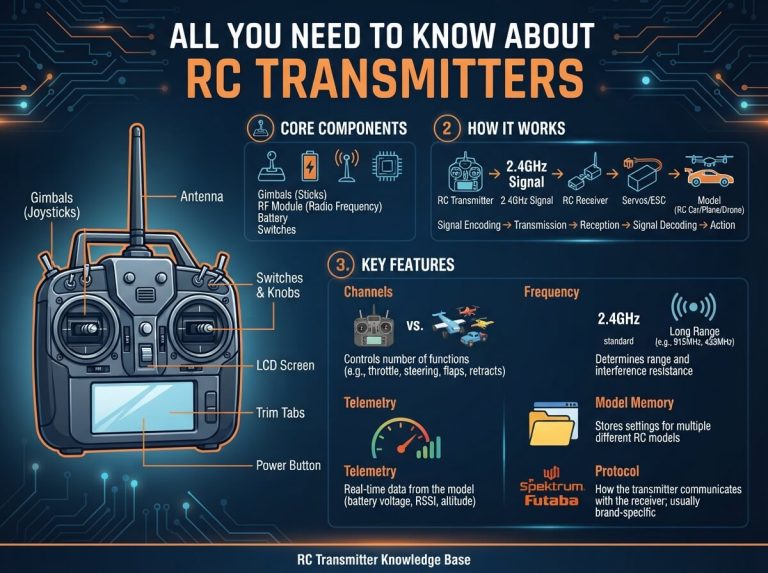
Your transmitter sends signals through the air to the receiver inside the car. Any break in that link kills steering. You check the receiver antenna first. A bent or broken antenna wire cuts range and makes steering cut out at distance.
You extend the antenna straight and tape it to the chassis if needed. Some cars hide the antenna inside the body shell. You make sure it points up and stays clear of metal parts.
Next you re-bind the transmitter and receiver. You power both units on while you hold the bind button. The receiver light flashes then goes solid when the pair connects. Every brand uses a slightly different bind process, so you follow the manual steps exactly.
Interference from other radios, Wi-Fi routers, or even cell phones jams the signal. You move to a clear field away from houses and power lines. 2.4GHz systems handle most interference better than older 27MHz or 49MHz ones. If you still get drops, you switch to a different channel or upgrade to a newer radio set.
You also test range. Walk twenty feet away and turn the steering wheel. The car should respond instantly. If it lags or twitches, you have a signal problem that needs fixing before you race again.
Linkage and Rod Issues Hide in Plain Sight
The servo connects to the wheels through plastic or metal rods called linkages. These parts take constant abuse from bumps and crashes. A bent linkage or popped ball joint stops steering dead.
You lift the front of the car and turn the wheels by hand. They should move freely left and right. If they stick or feel gritty, you inspect every joint.
You pop off the ball cups and check for cracks. Dirt packed inside the cups makes them bind. You clean them with a soft brush and a drop of light oil. Then you snap them back on firmly.
Adjustable turnbuckles let you fine-tune toe and steering throw. You loosen the lock nuts and twist the rod until the wheels point straight when the servo sits centered. This simple tweak fixes many “pulling to one side” complaints.
You also check the servo saver. This spring-loaded part protects the servo from crash damage. If the saver binds or the spring fatigues, steering feels mushy. You replace the saver or tighten the adjustment screw to restore crisp response.
Wheels and Suspension Can Lock Steering
Even perfect electronics fail if the wheels cannot turn. You look at the front suspension arms and knuckles. A bent arm or seized pivot ball stops movement cold.
You remove the wheels and spin each hub by hand. They should rotate smoothly. Any grinding means you clean or replace the bearings.
Tires matter too. Over-inflated or wrong-size tires rub against the body and limit steering lock. You check clearance on both sides at full turn. A quick trim with a hobby knife fixes minor rubbing.
Camber and caster settings affect how the car turns. You use a simple camber gauge to make sure both front wheels lean at the same angle. Uneven settings make the car pull or refuse to turn tightly.
For off-road cars, you inspect the shocks. Leaking oil or broken springs change ride height and bind the steering. You refill the shocks with the correct oil weight or replace any damaged parts.
Wiring and Connector Drama
Loose wires cause random steering glitches that drive you crazy. You trace every wire from the servo to the receiver. A single tug can pull a connector loose.
You wiggle each plug gently while the car runs. If steering cuts out, you have a bad connection. You unplug, clean the pins, and push the connector back until it clicks.
Hot glue or zip ties keep wires from vibrating loose during jumps and crashes. You secure every cable so nothing flops around.
You also check the power wiring to the receiver. Some cars use a separate battery eliminator circuit. If that tiny board fails, the receiver loses power and steering vanishes. You test voltage at the receiver pins to confirm steady 5 volts.
Interference and Range Problems
Big races or crowded parks fill the air with radio noise. Your 2.4GHz system usually fights through, but older crystal radios suffer badly. You switch channels or move to a quieter spot.
Metal buildings or chain-link fences bounce signals and create dead zones. You notice where the steering cuts out and avoid those areas.
You keep the transmitter antenna pointed up and away from your body. This small habit boosts range dramatically.
For serious racers, you add a signal booster or upgrade to a high-end radio with telemetry. These systems warn you before signal drops happen.
Fix Calibration and Setup Mistakes
Many steering issues start at the setup stage. You reset the transmitter trims to center. Then you power the car and let the servo find its neutral point.
You adjust the steering dual-rate knob on the remote. Too low a setting limits how far the wheels turn. You crank it up gradually until you get full lock without binding.
Endpoint adjustments in the radio menu prevent the servo from trying to turn past its mechanical limit. You set both left and right endpoints so the servo stops just before the linkage binds. This simple tweak saves servos from burnout.
You also check the steering expo setting. Positive expo makes the car turn smoothly at small inputs. Negative expo gives razor-sharp response for racing. You experiment until the car feels natural in your hands.
Advanced Fixes When Nothing Else Works
Sometimes the problem hides deeper. You test the receiver by swapping it with a known good one. If steering returns, you replace the original receiver.
You inspect the ESC for damage. A failing speed controller can send dirty power that confuses the steering channel. You check for swollen capacitors or burned spots on the board.
Nitro cars add another layer. The throttle servo and steering servo share space near the hot engine. Heat soak warps plastic parts and causes binding. You add heat shields or move the servo farther from the exhaust.
You consider a full radio upgrade for high-end cars. Modern sets with multiple channels and fail-safes prevent most glitches. The investment pays off in reliable steering run after run.
Keep Steering Reliable With Regular Care
Prevention beats repair every time. You clean the car after every run. Dirt and grass clog linkages and make them stiff. A quick spray of compressed air and a wipe-down keeps everything moving free.
You store batteries at proper voltage. LiPo packs last longer when you charge them to storage level between sessions.
You inspect screws and nuts before every race day. Vibration loosens parts fast. A drop of thread locker on critical fasteners stops them from backing out.
You rotate tires and check steering throw monthly. Small changes add up over time. Catching issues early keeps your RC car turning perfectly for years.
Tools You Need for Quick Repairs
You keep a basic kit ready. A set of hex drivers, pliers, and a small screwdriver handle most jobs. A servo tester costs little and saves tons of guesswork. A voltmeter tells you exactly when batteries need charging.
Zip ties, electrical tape, and spare ball links fix emergencies at the track. You pack extra servo horns and one spare servo in your bag. These few items turn a ruined day into a quick repair.
Common Mistakes That Waste Your Time
You avoid guessing by testing one thing at a time. Changing three parts at once leaves you unsure what actually fixed the problem.
You never force the wheels by hand while the servo runs. This strips gears instantly.
You read your specific car manual before you dive deep. Different brands wire servos and receivers in unique ways.
You stay patient. Some fixes take two minutes while others need careful adjustment. Rushing leads to broken parts and bigger headaches.
Real Stories From Fellow Racers
One driver spent hours chasing a ghost in his buggy. The steering worked on the bench but failed on the track. A loose antenna wire hidden under the body shell caused the dropouts. Ten seconds with tape fixed it.
Another racer fought sloppy steering for weeks. The servo saver spring had stretched out. A five-dollar replacement brought back razor-sharp turns.
These stories show you that simple things cause most failures. You stay calm and check the basics first.
When to Call for Extra Help
Most steering issues fall into the categories above. You solve them yourself and save money. But if you replaced the servo, checked every wire, and still get no movement, you might have a rare electronic failure.
Local hobby shops carry expert techs who test your components on professional gear. Online forums for your specific car model also share model-specific tricks that save time.
You post clear photos and exact symptoms when you ask for help. The community responds fast when you give good details.
Get Your RC Car Turning Again Today
You now know every major reason RC car steering stops working. You also have clear steps to test and fix each one. Start with batteries and work your way down the list. Most drivers solve the problem in under thirty minutes.
Take your time, stay safe, and enjoy the process. Nothing beats the feeling when your remote control car finally carves perfect corners again.
Grab your tools, head to the garage, and bring that steering back to life. Your next race or backyard bash will feel even better once the front wheels obey every command.
Happy driving, and may your RC car always turn exactly where you point it.

Peterson is an RC hobby enthusiast and product reviewer with a passion for remote-controlled cars, trucks, boats, drones, and accessories. He enjoys testing the latest RC products, comparing features, and sharing practical buying guides to help beginners and experienced hobbyists make informed decisions. Through RCThing.com, Peterson provides honest reviews, maintenance tips, and expert advice to help readers get the most from their RC adventures.