How to Change a Motor Curve for RC ESC?
If you’ve ever spent time tinkering with RC cars or drones, you’ve probably heard someone mention “motor curves” in a way that made your head spin. It sounds complicated, but I promise it’s not rocket science. In fact, changing your motor curve is one of the easiest ways to improve how your RC vehicle performs and feels. Let me walk you through the whole thing in plain English.
What Even Is a Motor Curve?
Think of a motor curve as the personality of your RC vehicle’s acceleration. It tells the electronic speed controller (ESC) how to translate your throttle input into actual motor speed. When you push your transmitter stick from zero to full throttle, the motor curve decides whether the speed increase happens fast, slow, or something in between.
Your ESC is basically a tiny computer that sits between your radio receiver and your motor. Every time you move the throttle stick, the ESC reads that signal and adjusts power sent to the motor. The motor curve is the blueprint it follows. Different curves create totally different driving experiences.
Some curves ramp up power gradually and smoothly. Others give you snappy, aggressive acceleration. Some curves even let you control how the motor spins in reverse. The cool part? Most modern ESCs let you choose or customize your curve to match your driving style.
Why Should You Care About Motor Curves?
You might be wondering if this is really worth your time. Here’s the truth: the right motor curve can transform your RC experience.
A poorly chosen curve makes your vehicle feel sluggish or twitchy. Maybe the throttle response is too delayed, or maybe it’s so aggressive that you lose control. A good curve? It makes steering smooth, gives you predictable power delivery, and helps you actually enjoy your driving.
Different activities need different curves too. Off-road racing demands quick response. Bashing around the yard might call for something more forgiving. Drifting needs smooth, linear power. Rock crawling requires low-speed precision. By adjusting your motor curve, you’re tailoring your vehicle to what you actually want to do with it.
It also helps with battery life and motor longevity. Some curves run the motor more efficiently, which means you can play longer before your battery dies. It’s a small tweak that pays dividends.
The Different Types of Motor Curves Explained
Most ESCs offer you several preset options. Let me break down what you’re usually looking at.
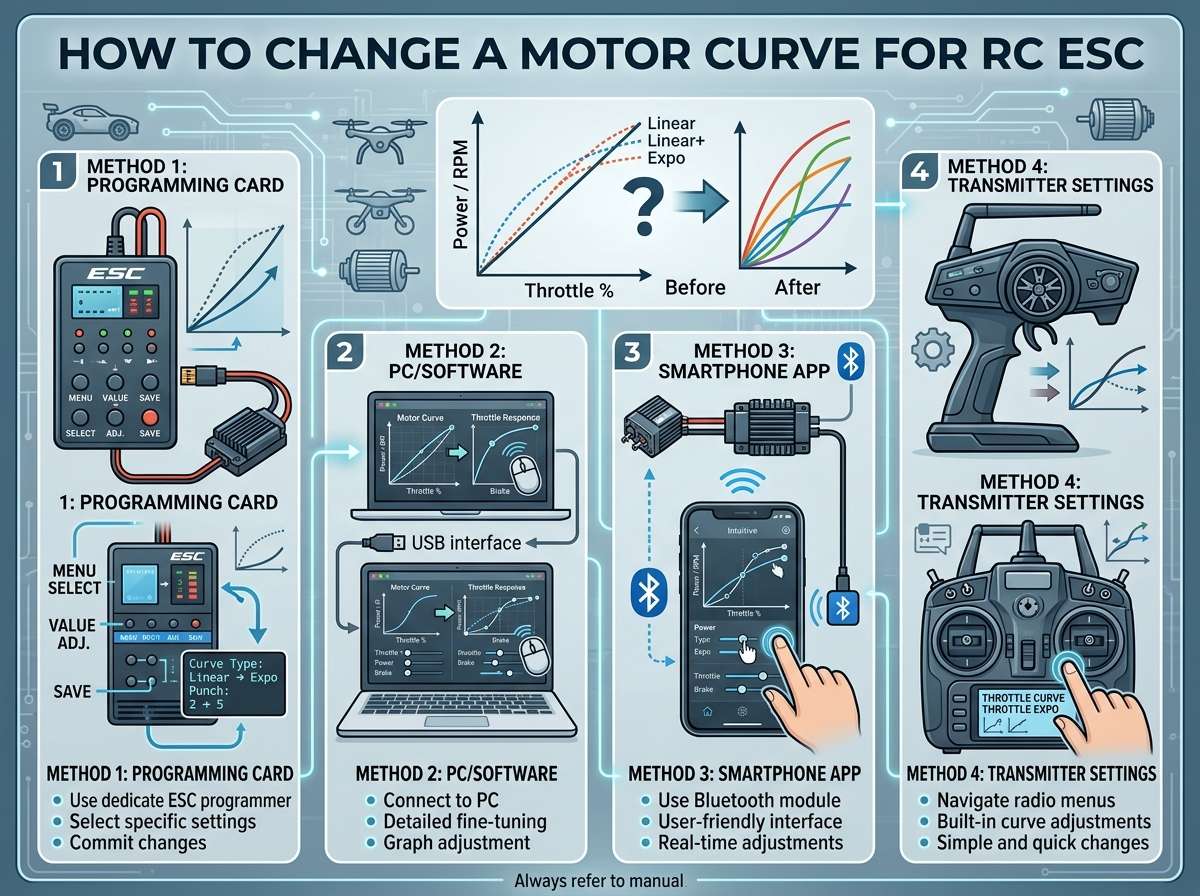
Linear curve is the most straightforward. Imagine a perfectly straight line from zero to one hundred. You get consistent power increase at every stage of the throttle range. Move the stick halfway, and you get half the power. This is great for beginners because it’s predictable and easy to learn with.
Exponential curve starts slow and then ramps up fast at the end. The first quarter of your throttle input gives you very little power, then it accelerates harder. This is popular for racing because you get fine control at low speeds and aggressive power when you need it. It demands more skill, but many experienced drivers swear by it.
S-curve is like the name suggests—it looks like an S. You get moderate power at the start, then it accelerates faster in the middle, then levels off a bit at the top. It tries to give you the best of both worlds: control at low speeds and power at high speeds.
Soft curve ramps up power very gradually. Everything feels smooth and mellow. If you’re just starting out or you’re driving in tight spaces, this might be your friend. It’s also good for delicate stuff like rock crawling where you need precision over power.
Hard curve is the opposite. It jumps to power quickly. It’s aggressive and responsive. Great if you want snappy acceleration, but less forgiving if you’re still learning throttle control.
How to Access Your ESC’s Settings
Before you can change anything, you need to get into the menu. The exact process depends on your ESC, but the general idea is always similar.
Most ESCs have a button on them. You press this button repeatedly to cycle through different options and menus. Some ESCs work with a computer programming card that you plug in. Newer ESCs often have smartphone apps that connect via Bluetooth. Check your ESC’s manual to see which method applies to yours.
If your ESC came with a programming card, this is actually pretty easy. You just plug the card into the JST connector on your ESC, hit the button to navigate, and adjust settings. The LED lights on the card tell you which setting you’re on.
A smartphone app is the most user-friendly way to go if your ESC supports it. You just download the app, connect your phone to the ESC via Bluetooth, and you’re looking at a nice interface. You can see your motor curve displayed as an actual graph, which makes things crystal clear.
Step-by-Step Guide to Changing Your Motor Curve
Let’s get into the practical part. Here’s how to actually change your motor curve.
Step one: Power on your system. Make sure your battery is charged and your transmitter is on and paired with your receiver. Don’t connect your motor yet if you’re a total beginner—just get the electronics powered up.
Step two: Enter the ESC menu. Press the button on your ESC. Usually you’ll hear beeps that tell you what menu you’re in. Count the beeps to figure out where you are. Your manual will show you the beep code for each setting. Keep pressing until you get to the motor curve menu.
Step three: Navigate to the curve options. Once you’re in the motor curve section, you’ll see options like “linear,” “exponential,” “soft,” or whatever your specific ESC offers. Press the button to cycle through them.
Step four: Select your curve. When you land on the curve you want, hold the button or press it a certain number of times (check your manual) to confirm your choice. You’ll usually hear a specific beep pattern that confirms the setting was saved.
Step five: Exit the menu. Once you’re done, get out of the menu. You can usually do this by waiting a few seconds, and the ESC will automatically go back to normal mode. You’re done!
If you’re using a programming card, the process is almost identical. Just use the card’s button instead of the ESC button, and watch the LED lights to see which menu you’re in.
Using an App to Change Your Motor Curve
The app method is honestly my favorite because it’s so visual. You can literally see a graph of your motor curve right on your phone screen.
Download the official app for your ESC brand. Make sure your phone’s Bluetooth is on. Turn on your RC system and make sure the ESC is powered. Open the app and scan for devices. Click on your ESC when it appears.
Once you’re connected, look for the motor curve section. You’ll usually see a settings menu or a graph view. In the graph view, you’re literally looking at how power scales with throttle input. The X-axis is your stick position, and the Y-axis is the motor speed.
Many apps let you do more than just pick presets. You can actually customize your curve by dragging points on the graph. Want a curve that’s linear at first and then exponential? You can create that. Want something totally custom? Go for it.
Play around and watch how the curve shape changes. It’s genuinely helpful for understanding what you’re doing. Save your curve when you’re happy with it, and you’re all set.
Testing Your New Motor Curve
After you’ve made changes, test them before you go full speed ahead.
Find a safe space like an empty parking lot or a park with nobody around. Turn everything on and give the throttle a gentle push. See how the motor responds. Is it smooth? Too jerky? Too slow to respond?
Take it slow the first time out. Drive around at low to medium speeds and get a feel for how it handles. Pay attention to steering response and acceleration smoothness. If something feels off, you can always go back and tweak it.
Do a few acceleration tests. Give it full throttle and see how fast the speed ramps up. Check if it feels natural to you. Some people love snappy response, while others find it scary. Find what works for your skill level.
Test braking too if your curve affects reverse or braking. Make sure stopping feels predictable and smooth.
After a few minutes of gentle testing, you can gradually get more aggressive with it. Once you’re confident, turn it up to normal speeds.
Common Mistakes People Make
Even though changing a motor curve is pretty simple, people still mess it up sometimes.
Not reading the manual. This is the number one problem. Every ESC is different, and your manual tells you exactly what beep codes mean what and which button combinations do what. Take five minutes to read it. Seriously.
Changing too much at once. Don’t jump from linear to hard exponential on your first try. It’s a big shock to your system and your skills. Step through changes gradually. Go from linear to soft curve, drive for a day, then move to exponential if you want.
Not testing safely. Some people change their curve and immediately take the vehicle out to a race. Bad idea. Test new curves in safe spaces first. You need to get used to the new feeling before you push the vehicle hard.
Ignoring your driving level. Beginners should stick with linear or soft curves. You need to learn throttle control first. Once you’re good, then experiment with more aggressive curves. Trying to run an expert-level curve before you’re ready just makes you sloppy.
Forgetting to save changes. Some ESCs require you to actively save settings, or they’ll revert to the default the next time you power up. Make sure you hit the save command before you think you’re done.
Fine-Tuning Your Curve
Once you’ve picked a basic curve, you might want to get more specific.
Some ESCs let you adjust the “sharpness” of your curve. This lets you take an exponential curve and make it more or less aggressive without switching to a totally different curve type. If exponential feels too snappy but linear feels too slow, sharpness adjustments let you find your sweet spot.
You can also adjust where the curve peaks. Some curves peak at 50% throttle input, meaning half stick gives you full motor speed. Others peak at different points. This changes how the entire feel of your vehicle adjusts.
Some fancy ESCs let you set different curves for forward and reverse. Maybe you want an aggressive curve going forward for fun, but a softer curve in reverse for safety and control.
Take your time with fine-tuning. Make small changes, test them out, and see what difference they make. Keep notes about what you’ve tried and how it felt. This helps you figure out what really works for you.
How Motor Curves Affect Different Driving Styles
Let’s talk about how various driving styles and activities benefit from different curves.
Racing usually benefits from exponential curves because you need quick power when you need it, but precise control at low speeds. Competitors often go even more advanced and create custom curves that are perfect for their vehicle and track.
Drifting thrives on smooth, linear power delivery. You need consistent throttle response to maintain your angle and speed. Exponential curves are too snappy for drifting and make it hard to keep smooth control.
Bashing is just having fun, so you can run whatever feels good. Most bashers use exponential or soft curves depending on whether they want to feel fast or just chill.
Rock crawling demands soft curves. You need super fine control at low speeds, and you don’t want power spikes that cause the wheels to spin or your rig to flip. Many crawlers even tune their curves even softer than the standard soft setting.
Freestyle or stunt driving works best with linear curves usually. You want to know exactly what the motor will do with any throttle input so you can dial in tricks.
Troubleshooting When Something Goes Wrong
What if you change your curve and something feels really off?
First, calm down. Changing a curve won’t hurt anything. You can always change it back. This is why we test safely first.
If acceleration feels too jerky, you probably have a curve that’s too hard. Switch to something softer.
If acceleration feels too slow and mushy, try a curve that’s more aggressive.
If you can’t remember what curve you were using before, most ESCs have a reset function that puts everything back to factory defaults. You can find this in your manual, or just swap to each curve type until one feels familiar.
If the motor doesn’t respond at all, make sure the battery is charged and the receiver is properly paired with the transmitter. Motor curve problems don’t cause total loss of power—that’s usually something more basic.
If steering feels weird or the motor cuts out randomly, that’s probably not a motor curve issue. That’s something else, and you should consult your ESC manual or a hobby forum.
Exploring Advanced Curve Customization
Once you’ve gotten comfortable with basic curves, you can go deeper.
Some modern ESCs have apps that let you create completely custom curves by clicking on a graph. You can create curves that have multiple peaks, or curves that do something unique at certain throttle ranges.
Some people create curves specifically for their motor and vehicle combo. They know that their motor hits peak torque at a certain RPM, so they tune the curve to hit that RPM right around the throttle range where they do most of their driving.
You can also experiment with different curves for different batteries. A fully charged battery and a nearly dead battery behave differently, and some people adjust their curve when they’re running on lower voltage.
There’s no limit to how technical you want to get with motor curves. But remember that the goal is to have fun. If you find yourself obsessing over microsecond response times, take a step back and just enjoy driving.
Final Thoughts
Changing your motor curve is honestly one of the best first modifications you can make to an RC vehicle. It costs nothing, takes five minutes, and can totally transform how your car or drone feels to drive.
Start with a safe choice like linear or soft curve. Test it thoroughly in a safe space. Then play around with other options and see what you like. There’s no one “right” answer—it’s just about finding what feels good to you.
The fact that you’re learning about motor curves means you’re getting serious about your hobby. This is the kind of small knowledge that separates casual drivers from people who really know their stuff. You’re going to notice things that other people miss, and you’ll have way more control over your vehicle.
Keep experimenting, keep testing safely, and keep having fun. That’s what RC is all about. Before you know it, tuning motor curves will feel totally natural, and you’ll be making micro-adjustments without even thinking about it.
Now get out there and find your perfect curve.

Peterson is an RC hobby enthusiast and product reviewer with a passion for remote-controlled cars, trucks, boats, drones, and accessories. He enjoys testing the latest RC products, comparing features, and sharing practical buying guides to help beginners and experienced hobbyists make informed decisions. Through RCThing.com, Peterson provides honest reviews, maintenance tips, and expert advice to help readers get the most from their RC adventures.