How To Read Rc Car Manual
Learning to read an RC car manual is one of the most useful skills a new hobbyist can build. The manual explains how to assemble, charge, set up and maintain your car. Many beginners skip it and go straight to driving, which often leads to mistakes or damaged parts.
This article explains what a manual contains and how to read each part. It also covers diagrams, safety notes and a simple method for following instructions. By the end, you will know where to look first.
Key Takeaways
- Read the safety warnings before you charge the battery or run the car.
- Scan the table of contents first so you know where each section lives.
- Match diagram callouts to the parts list before you remove anything.
- Read each assembly step fully before you touch the car.
- Keep the manual nearby for maintenance and troubleshooting later.
Why the Manual Matters Before You Run Your RC Car
What Parts of the Manual to Read First
Start with the front pages, not the assembly steps. These pages often hold safety notes, required tools and battery instructions. They also show what is included in the box.
Next, check the table of contents. It shows where the setup, tuning and troubleshooting sections begin.
How to Use Diagrams and Parts Lists
Diagrams show how parts fit together. Parts lists name each piece and give it a number. Read them together so you always know which piece you are holding.
Safety Notes You Should Never Skip
Safety notes protect you, the car and the people around you. Skipping them is the most common reason beginners damage batteries or chargers. Read every warning in full, even when a section looks familiar.
What an RC Car Manual Is and Why Beginners Need It
The Purpose of the Instruction Booklet
An RC car manual, sometimes called an instruction booklet, is the official guide from the maker. It explains how to build, prepare and operate the car as the designers intended. It is written for the exact model in the box.
For beginners, it is the most reliable reference available. It removes guesswork about wiring, battery use and part placement.
Common Sections Found in Most RC Car Manual Documents
Most manuals follow a similar order. They begin with safety information and a parts overview, then move to assembly, battery and radio setup, and maintenance.
Many also include a troubleshooting table listing common problems, likely causes and simple fixes.
Printed Manuals Versus Digital PDF Guides
Printed manuals are easy to keep near your workbench and need no screen. Their downside is that they can be lost or damaged over time.
Digital PDF guides can be searched by keyword and zoomed for small diagram text. You may still want a printed copy during assembly, when your hands are busy.
Getting Ready to Read Your RC Car Manual
Gathering Your Tools, Batteries and Parts
Before you read deeply, lay out the items the manual asks for. Most lists include hex drivers, pliers and a screwdriver set. Check the required tools list at the front of the booklet.
Sort the parts by bag or tray as you unpack them. This makes the parts list easier to follow and helps you spot missing pieces early.
Keep the batteries and charger separate from the car until the manual says otherwise. Confirm both are in the box, and read the charging notes before you connect anything.
Setting Up a Clear Space to Work
Choose a flat, well-lit table with room to spread out. A clean surface keeps small screws from getting lost and gives you space to compare diagrams with the real parts.
Keep a small container nearby for hardware. Place the manual where you can see it without moving your tools.
How to Read the Safety Warnings Section
Recognizing Warning, Caution and Note Labels
Manuals often use three label types. A warning signals a risk of injury or serious damage. A caution signals a risk of damage to the car or parts. A note gives helpful information that is not a safety issue.
Read every label before each step, even notes that seem minor. Labels are placed where mistakes are most likely.
Battery Safety and Charging Warnings
Batteries store a lot of energy, so their warnings matter most. Manuals usually explain the correct charger, voltage and connection method. They also warn against charging unattended or charging a damaged pack.
Stop charging if a battery becomes hot, swollen or smells unusual. Never use a charger the manual does not list as compatible.
Keeping Your Car Away From People and Pets
Remote control cars can move quickly and unpredictably. The manual usually advises running the car in open areas away from crowds, and it may recommend keeping children and pets at a safe distance.
Check the manual for guidance on parking lots, streets or water. Following these notes keeps others safe and protects your car from hazards.
How to Read Diagrams, Exploded Views and Parts Lists
Matching Part Numbers to Diagram Callouts
An exploded view shows parts pulled apart along a line. Each part has a number, called a callout, that points to it. The same number appears in the parts list.
Find the callout on the diagram, then find the matching number in the parts list. This gives you the exact name and quantity of each piece. Double-check the number before you install anything.
Following Step-by-Step Assembly Pictures
Assembly pictures usually show one step at a time. Arrows point to where a part goes, and small icons may show direction or torque. Look at the picture first, then read the text to confirm.
If the picture and text seem to disagree, pause and reread both. Small differences in orientation can change how a part fits.
Using a Parts List to Spot Missing Pieces
Compare the parts bags against the parts list before you start building. Count screws, bearings and other small items. Missing pieces are far easier to catch at the start.
If something is missing, check the manual for a parts contact or support page. Do not substitute a similar-looking part without confirming it is correct.
Specifications, Symbols and Technical Terms Explained
Reading Motor, Battery and Gear Ratio Specifications
Specifications list the facts about a car, such as motor type, battery format and gear layout. These details show what the car is built to do and which parts are compatible.
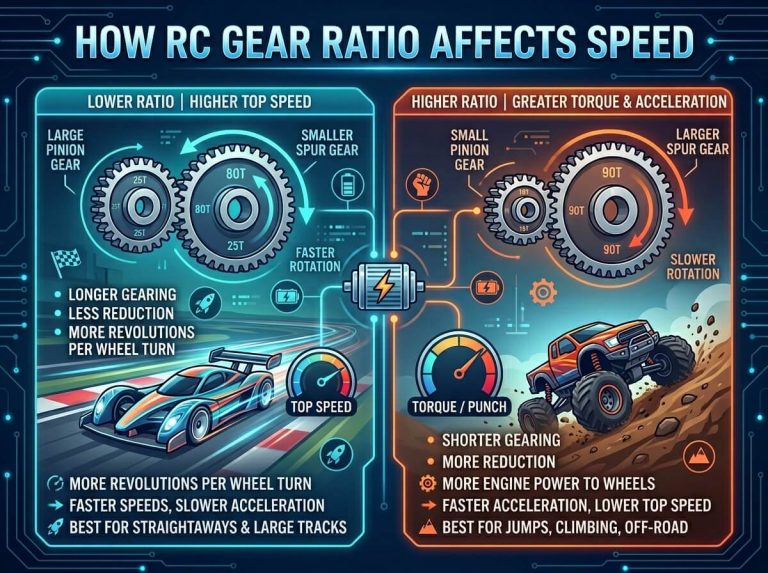
A gear ratio describes how many turns of one gear it takes to turn another gear once. Higher and lower ratios change speed and torque. The manual explains which ratio suits which surface and setup.
Common Symbols You Will See in Manuals
Manuals use small symbols to save space. A triangle or exclamation mark often marks a warning. Arrows show direction, and a wrench or tool icon may show which tool to use.
Check the symbol key if your manual has one. Symbols can differ between brands, so the key is the safest guide.
Plain-Language Glossary of RC Terms
Many RC terms sound confusing at first. A glossary, often near the back of the manual, explains them in simple words. Learning terms like brushed motor, brushless motor and ESC early helps.
A brushed motor uses small carbon contacts to pass power to the spinning part. A brushless motor uses magnets and electronics instead.
The ESC, or electronic speed controller, manages how much power reaches the motor.
Step-by-Step Method for Following Setup and Assembly Instructions
Reading Each Step Before Touching the Car
Read the whole step first, including the picture and any notes. Then imagine the action before you pick up a tool. This simple habit prevents many mistakes.
Perform each step slowly. Tighten screws until they are snug, not forced. Move on only when the current step is complete.
Checking Your Work Against the Manual
After finishing a section, compare your build to the diagram. Confirm that parts face the right direction and cables are routed as shown. Small checks like these catch errors early.
Some manuals include checkpoints or photos of the finished section. Use them as a final confirmation before you continue.
What to Do When a Step Is Unclear
If a step confuses you, stop and reread it. Compare the picture with the parts list to confirm the correct piece. Look for a related note or warning that may explain the detail.
If the step is still unclear, use the manufacturer’s support contact or online resources listed in the manual. Asking for help is better than guessing and risking damage.
Tips for Tuning, Maintenance and Troubleshooting From the Manual
Finding the Maintenance Schedule
Many manuals include a maintenance schedule. It lists tasks such as cleaning, checking screws, and inspecting tires or bearings. Following it helps your car run smoothly for longer.
Set a reminder for maintenance after each run session. Regular checks are easier than repairing a neglected car later.
Using the Troubleshooting Table
The troubleshooting table matches a problem to its likely causes and fixes. Find the symptom first, such as the car not responding. Then work through the causes from simplest to most complex.
Start with easy checks, like battery charge and connections. Move to more involved steps only if the simple fixes fail.
Recording Changes You Make to Settings
When you adjust settings, write down what you changed and why. Note the original value so you can return to it easily. A notebook or phone note works well.
Change one setting at a time so you can see what helped. Your notes also make it simpler to get help if something goes wrong.
Comparing Manuals From Different Brands and Kit Types
Ready-to-Run Versus Kit Manual Differences
Ready-to-run cars arrive mostly assembled. Their manuals focus on charging, radio pairing and basic operation. Kit manuals guide you through full assembly, so they run longer and carry more detail.
Pick the manual style that fits your experience. Beginners often find ready-to-run guides simpler, while kit guides reward patience and careful reading.
How Brand Layouts Can Vary
Each manufacturer organizes its manual differently. Some put safety information first, while others place it in a separate booklet. Symbols and terms can also change between brands.
Spend a few minutes learning your manual’s layout. Knowing where things live saves time later.
Spotting a Helpful Manual Before You Buy
A helpful manual has clear diagrams, numbered parts lists and plain-language instructions. It includes a troubleshooting section and a way to contact support. Look for these features when comparing kits.
A clear manual often signals a well-supported product. Check if the maker also offers digital copies or replacement booklets.
Frequently Asked Questions
Do I need to read the whole RC car manual before first use?
Reading the full manual before first use is the safest choice. At minimum, read the safety notes, battery instructions and setup section. You can review the maintenance and tuning sections later.
What if my manual is in a language I do not read well?
Many manufacturers print manuals in several languages, so check for another version. A digital PDF may also offer a different language. Diagrams often explain assembly even when the text is hard to follow.
Why do some RC car manuals use so many abbreviations?
Abbreviations save space and are common in technical fields. Most manuals define them in a glossary or near first use. Check the glossary whenever a short term is unfamiliar.
Where can I find a replacement or digital copy of my manual?
Start with the manufacturer’s official website or support page. Many brands post PDF versions there. The model name and number usually help you find the right file.
What should I do if the manual contradicts what I see on my car?
Check that you are looking at the same model and version. Compare the diagram closely with the actual part, and look for a revision notice. If the conflict remains, contact the manufacturer’s support before continuing.
Conclusion
Learning how to read an RC car manual saves time, money and frustration. Start with the safety notes, table of contents and parts list. Then follow each step slowly, check your work and keep notes on any changes. A careful reader gets a safer build and a car that runs well for longer.

Peterson is an RC hobby enthusiast and product reviewer with a passion for remote-controlled cars, trucks, boats, drones, and accessories. He enjoys testing the latest RC products, comparing features, and sharing practical buying guides to help beginners and experienced hobbyists make informed decisions. Through RCThing.com, Peterson provides honest reviews, maintenance tips, and expert advice to help readers get the most from their RC adventures.