5 Best Fpv Simulator In 2026
As an Amazon Associate we earn from qualifying purchases.
Flying a first-person view (FPV) drone takes practice, and crashes are costly. A flight simulator lets beginners build control skills on a computer before touching a real aircraft. This guide helps people who are new to FPV choose a practical setup. It covers five products that range from a simple simulator controller to a full beginner kit.
All five products share a few traits. Each one is a hand-held controller, called a transmitter or remote, that connects to a computer or works with simulator software. Most use a similar stick layout, known as Mode 2, which is the most common layout in FPV flying.
In Mode 2, the left stick controls throttle and yaw, while the right stick controls pitch and roll. The comparison below rests on the listed features and typical use, not on personal testing.
Before you buy, it helps to know what you want from the hardware. A simulator-only controller is cheap and safe for learning, but it cannot fly a real drone. A radio transmitter can fly a real drone, but it usually needs extra parts and careful setup. Decide which of these matters more to you right now.

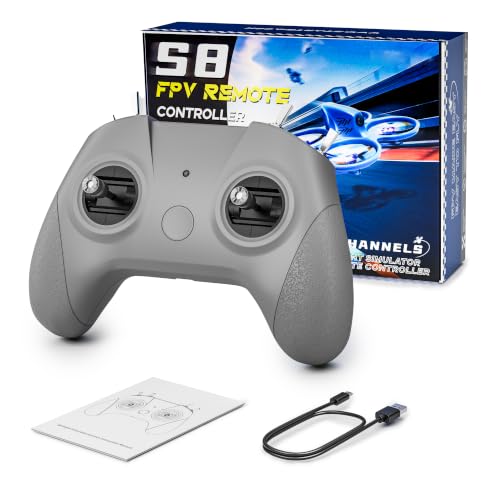


1. STARDRONE S8 FPV Flight Simulator Controller: best for budget-minded beginners
This is a dedicated simulator controller, meaning it is built to work with flight simulator software and not to fly a real drone. It suits beginners who want to practice on a computer at a modest cost. It is also a sensible starting point for a gift. Because it targets the simulator only, you do not need to learn radio binding or drone configuration yet.
What it is and who it suits
The controller has two sticks, a set of buttons, and a USB Type-C cable that plugs into a Windows, macOS or Android device. It is aimed at teenagers and adults who are just starting out. It also fits people who want a simple way to learn the basics of throttle and steering. Practicing these basics on a simulator first can reduce the number of crashes when you move to a real aircraft.
Key features in simple terms
The throttle uses non-centering technology, so it stays where you leave it instead of snapping back to the middle. This matters in FPV because the throttle controls altitude. A self-centering throttle would return to the middle and cut power on its own, which is harder to manage in a hover.
The listing says it works with more than 30 simulator programs, including Uncrashed, Liftoff and DRL. Check that your chosen program appears on the compatibility list before you buy.
Daily use and real-life feel
Because it needs no batteries, you simply plug it in and start practicing. Sessions tend to feel more comfortable thanks to the grip, which the listing describes as anti-slip and contoured. The body is light, at about 140 grams, which helps during longer practice. Short, regular sessions of 20 to 30 minutes are often easier on your hands and focus than one long session.
Performance and ease of use
The listing describes responsive, consistent stick movement. Setup is mostly plug and play, although calibration involves a short button sequence. Calibration is a step where the controller learns the full travel of each stick, and the manual explains it. Run calibration once before your first session, and repeat it if the sticks seem to drift or stop short of full movement.
Value for money
At the listed price, this controller sits at the lower end of the range in this round-up. It gives beginners a way to practice without a large spend. Buyers who plan to move on to a complete kit later may find it a useful first step. Keep in mind that a simulator skill transfers to a real drone, but the controller itself does not.
Pros
- Low price for a dedicated simulator controller
- Non-centering throttle that suits FPV-style practice
- Works with a wide list of simulator programs
- No batteries needed, just a USB connection
Cons
- Works only with a wired USB connection to a computer, with no Bluetooth
- Calibration can take a few tries if it fails at first
- Seller standing is described as moderate, so buyers may want to check recent feedback
- Does not control a real drone
2. FLYDrone S8 Pro FPV Simulator Controller: best for Windows users wanting a steady wired setup
This controller is also built for simulator training only. It is aimed at beginners who use a Windows PC and want a stable, wired connection. Its layout is similar to the other S8 models in this round-up, so anyone who has already tried one will feel at home quickly.
Who it is designed for
The product is written for beginner FPV pilots who want to build throttle control and stick coordination before they ever fly a real aircraft. It also suits drone training classes and hobby pilots who want a dedicated controller for practice sessions. Teens and adults can both use it, provided they have a compatible Windows computer and a simulator installed.
Features explained simply
Like the first model, it uses non-centering throttle and the Mode 2 stick layout. Mode 2 means the throttle is on the left stick and the steering is on the right, which is the most common layout for FPV flying. Non-centering throttle means the stick stays where you leave it, much like a real drone throttle, so you learn to hold a height rather than let it spring back.
Because the setup is wired, there is no pairing step to worry about and no batteries to replace. You plug it in, and the computer recognizes it. The listing says it works with several popular simulators, including Liftoff, DRL, Uncrashed and VelociDrone. Before buying, check that your preferred simulator appears on that list, since support can differ from one title to the next.
Daily use and real-life feel
The compact body and grip texture are meant for longer sessions. The listing gives a weight of 160 grams, which is slightly heavier than the first controller but still light enough to hold for extended practice. In practice, a buyer who switches between simulator games will find the plug-and-play setup quick to start, with no extra software to set up before the first flight.
Because the controller stays on your desk, the cable is the main thing to plan around. Position the computer so the cable reaches your hands without pulling on the sticks. A short tidy-up of the cable at the start of each session can make practice feel more comfortable.
Performance and ease of use
Control feels direct because the connection is wired and the sticks are set up for realistic movement. The calibration process follows a short sequence of button presses and stick positions. Follow the manual’s steps in order, and move each stick fully through its range when asked, so the software can record the full travel.
If calibration does not complete, the manual suggests restarting the process or rebooting the controller. Unplugging and reconnecting the USB-C cable can also help the computer detect the device again. Most beginners will find the setup manageable with a little patience.
Value for money
This model costs more than the first S8 controller, so the extra spend should be weighed against the features. Buyers who want a stable wired controller for Windows may see the difference as worthwhile, especially if they plan to practice regularly. Others might prefer to start with a lower-cost option and upgrade later if they keep flying the simulator.
Pros
- Wired USB-C connection with no pairing or batteries
- Non-centering throttle for FPV-style practice
- Compatible with a broad list of simulator titles
- Compact body with an anti-slip grip
Cons
- Costs more than the basic S8 controller
- Simulator use only, so it cannot fly a real drone
- Calibration may need several attempts
- Seller standing is described as moderate
3. Radiomaster T8L ELRS 2.4GHz Radio Transmitter: best for buyers who plan to fly real drones
This is a radio transmitter, meaning it can control real aircraft as well as work with simulators. It suits buyers who want one controller for both practice and outdoor flying. It is a step up from a simulator-only device.
What it is and who it suits
A transmitter sends signals to a drone or plane. The T8L uses ExpressLRS, a radio link protocol known for long range and low delay. Hobby pilots who want to grow from simulator practice to real flying will find this a practical choice.
Key features in simple terms
The sticks use Hall-effect gimbals, a sensor type that reads stick position without physical contact. The listing says this design avoids mechanical wear. The unit weighs 204 grams and has no screen, so settings are changed through a browser-based interface on Chrome or Edge.
Real-life use and portability
The compact size makes it easy to carry in a bag for indoor or park sessions. Because it has no screen, setup happens on a computer rather than on the device. Buyers should note that the battery cell is not included, so a separate battery is needed for flying.
Performance and ease of use
The listing describes smooth, consistent stick movement suited to micro drones and fixed-wing aircraft. Binding to a receiver is described as a one-click process. Because the web interface handles trims and switch settings, beginners may find it simpler than traditional on-screen menus.
Value for money
This is the highest-priced item in this round-up. The added cost reflects its use with real aircraft, not only simulators. Buyers who only want to practice indoors may not need this level of hardware.
Pros
- Works with both simulators and real drones
- Hall-effect gimbals designed to reduce wear
- Lightweight and easy to carry
- Browser-based setup with no extra software
Cons
- Higher price than the simulator-only controllers
- Battery cell not included
- Screenless design means setup depends on a computer
- Requires an ExpressLRS receiver for real flying
4. ST 4. STARDRONE S8 RC Flight Simulator Controller: best for beginners wanting multiple simulator modes
This is another simulator-only controller from the same brand family as the first product. It stands out for its light-based mode selection, which helps match the controller to different simulator programs. It suits beginners who plan to try several simulator titles.
Who it is designed for
The listing aims the product at FPV beginners who want to practice from the start and later move toward more advanced training. It also suits people who like to switch between different simulator games. Teens and adults are both listed as suitable users.
Features explained simply
The controller uses non-centering throttle and a button layout meant to mirror a real drone. The listing notes that the left stick does not return to center, which is intended behavior and not a fault. It offers four light modes, with each color matched to a group of simulators, such as yellow for Steam titles and blue for Phoenix RC.
Daily use and real-life feel
Because there is no power button or battery, the controller switches on when plugged in. The indicator light confirms a connection. The curved body and textured grip are designed for a firm hold, which can help during longer sessions.
Performance and ease of use
Plug-and-play setup is the main strength here. The color-coded modes can make it simpler to pick the right profile for each simulator. Calibration follows the same button-and-stick routine used by the other S8 models in this round-up.
Value for money
Its listed price sits between the lower-cost S8 controller and the more expensive S8 Pro. Buyers who value multiple simulator profiles may find that useful. Those who only use one simulator may not need the extra modes.
Pros
- Four light modes for different simulator groups
- No batteries or power button needed
- Button layout designed to match real drone controls
- Ergonomic body suited to longer sessions
Cons
- Wired connection only, with no Bluetooth support
- Left stick behavior may surprise some new users
- Works only on Windows, according to the listing
- Seller standing is described as moderate
5. BETAFPV Aquila16 FPV Kit: best for beginners who want a complete starter set
This is a full starter kit that includes a small drone, video goggles and a transmitter. It is the most complete item in this round-up and the most expensive. It suits buyers who want to move from simulator practice to real flight in one purchase.
What the kit includes and who it suits
The kit contains the Aquila16 quadcopter, VR03 FPV goggles and the LiteRadio 2 SE transmitter. Each part has a clear job. The drone flies, the goggles show the live camera view from the drone, and the transmitter sends control signals to the drone.
The transmitter can also run with simulator software, so new pilots can practice stick control before they fly a real drone. The kit is aimed at beginners who want a hands-on starting point, both indoors and outdoors.
Key features in simple terms
The drone offers three flight modes and three speed settings. Lower speed settings are easier to control, which helps during the first flights. Turtle mode helps the drone flip back over after a crash, so the pilot does not need to walk over to fix it.
The listing says the default battery gives about 8 minutes of flight. The goggles include a recording and replay function, so pilots can review their flights and see where they made mistakes.
Real-life use and what to expect
Flight time is short, so pilots will need spare batteries for longer sessions. Charging a battery between flights takes time, so having two or three batteries ready keeps practice sessions going. The listing notes that the camera cable can loosen after repeated crashes, so checking connections is part of routine care.
Position hold works only in one of the flight modes, which is worth knowing before the first flight, because the drone will not hold its place in the other modes.
Performance and ease of use
The transmitter uses ELRS firmware for a wider operating range and allows calibration and updates directly on the device. A wider range gives the pilot more room to fly before the signal weakens. The simulator support helps pilots practice before flying.
Beginners may still find the first weeks challenging, since real flight adds wind and battery limits that a simulator cannot fully copy. Starting in a calm, open space with no wind makes the early learning curve easier.
Value for money
This is the highest-priced option here, and it covers a lot of hardware. Buyers get a drone, goggles and a transmitter in one set, which can cost less than buying each part separately. Even so, the total is a real commitment, and the listed battery life means extra batteries are worth budgeting for. Buyers who only want simulator practice will not need this kit, since simulator software alone costs far less.
Pros
- Complete starter set with drone, goggles and transmitter
- Turtle mode helps recover the drone after a crash
- Goggles include a recording and replay function
- Transmitter supports simulator practice before real flights
Cons
- Highest price in this round-up
- Default battery gives about 8 minutes of flight
- Camera cable may need checking after repeated crashes
- Position hold works only in one flight mode
Comparison insights: performance, ease of use and value
The five products fall into two groups. Four are simulator controllers, and one is a full kit with a real drone. The difference in purpose shapes almost every comparison point. A simulator controller trains your skills on a computer screen, while a kit lets you practice with a real aircraft in the air.
For performance, the simulator controllers all use non-centering throttle and similar stick layouts. The Radiomaster T8L stands out for its gimbal design and its ability to control real aircraft. The Aquila16 kit is the only option that delivers real flight, so it is the only one where you will feel wind, weight and battery behavior directly.
For ease of use, the wired S8 controllers offer the quickest start. Plug in, calibrate, and begin. The T8L asks for a browser-based setup and a receiver, which adds steps. The Aquila16 kit requires the most learning, since real flight introduces wind and battery management. Beginners should expect a slower first week with the kit than with any simulator option.
For value, the basic S8 controller costs the least and suits a first step. Spending more makes sense only when the extra features match a real need. A buyer who plans to fly outdoors may find the kit or the transmitter more useful over time, because those options grow with the buyer’s goals instead of being left behind after the first few sessions.
Buying guide: key factors explained in plain words
Before picking, it helps to know what the terms mean. A simulator controller only works with software on a computer. A transmitter can also fly real aircraft when paired with a receiver. A kit includes everything needed to fly, from the drone to the goggles, so you do not need to buy parts separately.
Connection type
Most simulator controllers use a USB cable. Wired connections are stable and need no pairing, so they are a common choice for first-time users. Some transmitters use radio links instead, which allow real flight but need a receiver installed on the drone.
Throttle style
A non-centering throttle stays where you leave it. This is the behavior used in most FPV flying, so many beginners prefer it for practice. A spring-return throttle snaps back to the center or bottom, which feels different under the hand. Check the listing to confirm which throttle style a product uses.
Mode layout
Mode 2 is the most common stick layout in FPV, where the left stick controls throttle and yaw and the right stick controls pitch and roll. Mode 1 and Mode 3 also exist. Picking a controller that matches the mode taught in your training material can make learning smoother, because your muscle memory will match the lessons you read.
Software compatibility
Check that the controller works with the simulator you plan to use. Listings often name supported programs. A wider list gives more room to switch training goals later, for example from racing practice to freestyle practice.
Comfort and size
Grip texture, body curve and weight affect how long a session feels. Lighter controllers can be easier on the hands during long practice, while a firm grip helps control during fast movements. Reading the listed weight and dimensions can help set expectations before the box arrives.
Setup and calibration
Calibration teaches the controller the full range of each stick, so inputs match what your hands intend. Most products describe a button sequence or a software step for this. Plan some time for the first setup, and keep the manual handy in case a step needs a second look.
Budget and extra costs
The listed price is only the start for some items. Real flight may need batteries, chargers, receivers or spare parts, and these can add up quickly. Budget for these extras before buying, so an unexpected accessory does not stop your progress.
Who should buy these products
Each product suits a different type of buyer. Matching your goal to the right item avoids paying for features you will not use. The list below is a general guide based on the listed features.
Start by asking one question: do you want to practice on a computer, or do you want to fly a real drone soon? Your answer narrows the field quickly. Budget matters too, because some options include more hardware than others.
- Budget beginner on a computer: The STARDRONE S8 FPV Flight Simulator Controller suits someone who wants a low-cost way to start practicing. It connects to a computer and works with simulator software, so no drone is needed.
- Windows user wanting a steady wired setup: The FLYDrone S8 Pro suits a buyer who values a direct USB connection and a broad list of features. It also suits a compact, comfortable controller for longer practice sessions.
- Hobby pilot moving toward real flight: The Radiomaster T8L suits someone who wants one transmitter for simulators and outdoor drones. It needs a compatible receiver and drone to fly real aircraft.
- Several simulator titles, one controller: The second STARDRONE S8 model suits someone who likes switching between programs and wants color-coded profiles. Each profile can be set up for a different title, which keeps controls organized.
- Complete beginner wanting everything in one box: The BETAFPV Aquila16 FPV Kit suits someone ready to fly a real drone and budget for spare batteries. Flight packs wear out with use, so extra batteries help you keep flying between charges.
Final verdict
No single product is the right answer for everyone. The best choice depends on if you want to practice only, or also fly real drones. Budget and patience also matter.
For practice alone, the basic STARDRONE S8 offers the lowest entry cost. The S8 Pro and the second S8 model add features that suit steadier or multi-simulator use. Each still works only with simulators, so it will not fly a real aircraft.
For a path into real flight, the Radiomaster T8L and the Aquila16 kit are the stronger options. The T8L suits buyers who already own or plan to buy a receiver and drone. The Aquila16 kit suits buyers who want everything in one set. In short, start with simulator practice, and move to real flight once the basics feel comfortable.
Frequently Asked Questions
Do I need a real drone to use a flight simulator?
No. A simulator runs on a computer and lets you practice without any hardware in the air. A controller connects to the computer to give you realistic stick control.
What is a non-centering throttle?
It is a throttle that stays where you leave it instead of springing back to the middle. Most FPV flying uses this style, so practicing with it helps build useful habits. A spring-return throttle, by contrast, snaps back to center when released.
Can a simulator controller fly a real drone?
Not in these listings. The S8 controllers are described as simulator-only. A radio transmitter like the Radiomaster T8L can control real aircraft when paired with a suitable receiver.
Are these controllers wireless?
The S8 controllers in this round-up connect by USB cable only. The listings state that Bluetooth connection to a PC is not supported.
Which option is best for a complete beginner?
A complete beginner who wants to start with practice should consider a basic simulator controller first. A buyer ready for real flight may prefer the Aquila16 kit, while budgeting for spare batteries.
Peterson is an RC hobby enthusiast and product reviewer with a passion for remote-controlled cars, trucks, boats, drones, and accessories. He enjoys testing the latest RC products, comparing features, and sharing practical buying guides to help beginners and experienced hobbyists make informed decisions. Through RCThing.com, Peterson provides honest reviews, maintenance tips, and expert advice to help readers get the most from their RC adventures.