5 Best RC Airplane Transmitter In 2026
As an Amazon Associate we earn from qualifying purchases.
Picking the best RC airplane transmitter can feel confusing at first. The transmitter, also called a radio or radio controller, is the handheld unit you use to send commands to your model plane. This guide helps beginners understand what each radio offers and which type of buyer each one suits.
The five products in this round-up share a common purpose: they all send control signals to RC models, including airplanes. They differ in channel count, range features, screen and telemetry options, and price. This comparison rests on the listed features and typical use, not on personal testing.


1. Radiolink AT10II 12CH 2.4G RC Transmitter: best for long-range telemetry on a budget-friendly radio
The Radiolink AT10II is a 12-channel radio with a 3.5-inch color screen. It uses a 2.4GHz signal, which is the standard band for modern RC radios. It suits pilots who want more channels and on-screen data than a basic entry-level radio offers.
Channels are the separate control paths a radio sends to the model. Each channel can move a servo, which is the small motor that operates a control surface, a throttle or a switch. A 12-channel radio gives enough paths for a typical airplane with several added functions.
Best use cases
This radio fits fixed-wing airplanes that need several controls, such as flaps, retracts or multiple servos. It also works for helicopters, cars and boats. Its many channels give room to grow as your skills improve. A beginner flying a simple trainer may use only four or five channels at first, so the extra capacity waits until it is needed.
Key features in simple words
The radio uses a hybrid spread-spectrum method. In plain terms, the signal jumps across frequencies so it resists interference. The listed range is up to 4,000 meters in the air, paired with a high-gain antenna.
Real-world range depends on the receiver, the antenna position and local conditions, so treat the listed figure as a manufacturer claim rather than a guarantee. The screen can show battery voltage, and an optional module adds speed, altitude and GPS readings.
It also includes dual and triple rates, exponential settings and fail-safe options. These let you tune how the airplane responds and what it does if the signal drops. Dual rates limit how far a control surface moves at a given stick position, while exponential softens the response near the center. Fail-safe settings define where each servo goes if the link is lost. Fifteen model memories let you store several aircraft.
Daily use feel
In practice, the dual menu helps a beginner start with simple basic settings. Later, the advanced menu gives access to deeper mixing and tuning. Mixing lets one stick control two surfaces, such as elevons on a flying wing. The on-screen warnings for low voltage and weak signal are useful reminders during a flight day.
Performance and ease of use
The listed servo control is smooth, with a 3ms response. The listed runtime is 12 hours on a 1800mAh 3S LiPo battery, and the radio accepts AA batteries or 2S to 4S LiPo packs. You must set the alarm voltage to match your battery type, which is a step beginners should not skip. A wrong alarm setting can mean the warning sounds too late, or too often to be useful.
Value for money
The price sits in the mid range. You get a screen, telemetry options and many channels for the cost. Buyers who want telemetry without moving to a premium radio often find this a sensible middle choice. Compare the total cost too, since the optional telemetry module and a compatible receiver are separate purchases.
Pros
- Twelve channels and fifteen model memories
- Large color screen with voltage telemetry
- Dual menu system suits beginners and experts
- Works with several battery types and has reverse polarity protection
Cons
- The alarm voltage must be set manually for each battery type
- Full telemetry requires an optional module and flight controller
- Only compatible with Radiolink receivers, which limits receiver choice
2. Flysky FS-i6 6CH 2.4GHz AFHDS RC Transmitter: best for simple beginner setups
The Flysky FS-i6 is a 6-channel radio that comes with its own receiver. It is a straightforward option for someone starting with a basic airplane, glider or quadcopter. It keeps the number of controls manageable, so a new pilot can focus on learning to fly rather than learning the radio.
Best use cases
This radio suits a simple trainer airplane or glider that needs only a few controls. It also covers multirotor and helicopter basics. Many beginners pick a smaller radio first, because it keeps the controls easy to learn. A simple trainer with throttle, aileron, elevator and rudder maps well onto the six channels.
If you plan to add retracts, lights or several flight modes later, you may outgrow this radio. In that case, a higher-channel model would be a better long-term choice. Think about the aircraft you plan to fly in the next few months before you buy.
Key features in simple words
The radio uses a 2.4GHz signal with a system called AFHDS 2A, which helps the link stay steady. Each transmitter has a unique ID, so the receiver accepts commands only from its own radio. The listed design uses low power components, which helps reduce battery drain.
The included FS-iA6B receiver keeps the setup complete in one box. You do not need to buy a separate receiver to start flying. That makes the purchase simpler for a first-time buyer, who might otherwise have to match a receiver to a transmitter by hand.
Daily use feel
In practice, six channels cover the basic controls of a simple airplane: throttle, aileron, elevator, rudder and a switch or two. Fewer controls mean fewer things to remember on the field. Many new pilots find this helpful in the early weeks, when a long list of settings can feel overwhelming.
The switches give you a simple way to change one function at a time. For example, you might use one switch to arm a motor or another to set a flight mode. Learning what each switch does before your first flight is a good habit.
Performance and ease of use
The listed design uses a multi-directional antenna and a sensitive receiver. The radio is built to resist jamming over a long range. Setup stays basic, with fewer menus than advanced radios, which suits a beginner well.
Real range always depends on conditions such as terrain, obstacles and battery health. Treat any listed range as a best-case figure. Always perform a range check on the ground before flying.
Value for money
This is the lowest-priced radio in the round-up. You get a complete set with a receiver, which keeps the total cost down. Buyers who want to learn without a large investment often find it a practical starting point.
Keep in mind that a cheaper radio can limit your options later. If you expect to grow into more complex models, factor in the cost of an upgrade. For a single simple aircraft, the savings can be a sensible trade-off.
Pros
- Lowest price in this round-up
- Receiver included in the box
- Simple layout with fewer controls to learn
- Unique transmitter ID helps prevent mix-ups
Cons
- Six channels limit the controls for more complex airplanes
- Few advanced features compared with higher-channel radios
- No built-in telemetry screen is listed in the data
3. Radiolink T8FB 8 Channels 2.4GHz RC Remote: best for smartphone setup and flexible control
The Radiolink T8FB is an 8-channel radio that you can set up with a smartphone app. It sits between a basic six-channel radio and a larger 12-channel model. It suits pilots who want more control without a large budget.
Best use cases
This radio fits airplanes with a few extra functions, such as retracts or lights. It also works with cars, boats and some robotics projects. Its wide compatibility makes it useful for hobbyists who try several model types.
The extra two channels over a six-channel radio give you room for one or two more functions. That can be useful once you move past the basics. If you only ever fly one simple trainer, the extra channels may go unused.
Key features in simple words
The radio uses frequency hopping across 67 channels, which helps it avoid interference. The maker lists a control distance of up to 2 kilometers, and up to 4 kilometers with the R8XM receiver sold separately. The T8FB connects by Bluetooth to an iOS or Android app, where you adjust settings like endpoints and dual rates.
Endpoints set how far each servo moves, and dual rates let you change how sensitive the controls feel. Being able to adjust these in an app makes learning easier. The radio also includes a training function and a simulator option. The listed battery connector accepts AA batteries or 2S to 4S LiPo packs. It includes reverse polarity protection, so a wrong battery connection should not damage it.
Daily use feel
In practice, the app makes changes quick, because you do not need to press through a long menu on the radio. A beginner can adjust settings at home and test them later. The battery alarm sounds when voltage drops, which is a helpful reminder to land and recharge before a problem starts.
Some pilots prefer a fully physical radio with no phone involved. Others find the app easier to read than small screen menus. Consider which style suits you before you buy.
Performance and ease of use
The listed current draw is below 80mA, which is modest for a radio of this size. Setup through the app is simple, though it depends on your phone and the app being available for your device. The stated range figures are useful, but actual range depends on conditions.
Because the app handles many settings, it is a good idea to save your model profiles and back up your settings. This way, you can restore a working setup if something changes. Always check your control directions and failsafe settings before the first flight.
Value for money
The price is among the lowest in this round-up, while the channel count is higher than the six-channel radio. You get app setup and extra channels for a modest cost. For many buyers, that balance makes it a good middle option.
Remember that the battery pack is not included. Factor the cost of a suitable battery into your budget. Once you add a battery, the total still stays competitive for an 8-channel radio.
Pros
- Eight channels at a modest price
- App setup with Bluetooth connection
- Reverse polarity protection and automatic battery voltage adjustment
- Works with several autopilot and microcontroller systems
- Good fit for hobbyists who try different model types
Cons
- Relies on a phone app for many settings, which some beginners may find less direct
- The longer 4-kilometer range needs the R8XM receiver, sold separately
- Battery pack is not included, so an extra purchase may be needed
4. Radiolink T12D V2 2.4G 12 Channels JR ELRS RC Transmitter: best for FPV and modular long-range setups
The Radiolink T12D V2 is a 12-channel radio built around a standard module bay. It accepts ELRS and TBS Crossfire modules, which are popular long-range link options. It suits pilots who want to upgrade their range and control over time.
A module bay means you do not have to buy a whole new transmitter when you want a different link. You can swap in a compatible module as your flying needs grow. That makes the radio a practical base for a hobby that often changes.
Best use cases
This radio works well for FPV flying, where a pilot relies on a clear and steady control link. It also covers fixed-wing airplanes, gliders, cars and boats. A pilot who flies several model types can keep one radio for all of them.
The wireless trainer mode can help an instructor teach a student without a cable. The instructor holds the main radio, and the student flies through a linked transmitter. This is useful at a flying field where a trainer cord would be awkward to manage.
Key features in simple words
The radio has a Micro JR module bay, so you can slot in a compatible long-range module. The maker lists a range of up to 4 kilometers and a 3ms response across all 12 channels. A built-in screen shows signal strength and battery voltage, which supports safer flying.
The radio can be powered from a USB-C power bank or a 2S to 4S LiPo battery. A power bank can be a convenient choice for a short field session when you do not want to carry a separate battery pack.
It also connects to a computer over USB for simulators such as Liftoff and Uncrashed. Practicing in a simulator lets you learn controls before you risk a real model. The listed mix controls cover several model types, including fixed-wing and dual-engine boats.
Daily use feel
In practice, the plug-in module keeps the setup tidy once it is installed. Most of the work happens once, when you fit the module and set up the link. After that, the radio is ready to fly with less fuss.
The power bank option can be handy for a field session without a separate battery pack. The screen helps you check the link before you take off. Checking signal strength and voltage before each flight is a simple habit that can prevent problems.
Performance and ease of use
The listed response time and channel count place this radio in a capable range for its class. Twelve channels give you room for extra functions, such as lights, flight modes or gimbal controls. A pilot who needs only four or six channels will not use most of them.
The menu supports language switching and custom themes, which can make the layout easier to follow. Some features, however, take time to learn, especially the mix controls. Reading the manual and setting up one model at a time makes the learning curve more manageable.
Value for money
The price is in the mid range, and the module bay adds flexibility. Buyers who plan to add a long-range module later can grow into this radio. Keep in mind that the module itself is an extra purchase.
Those who need only a basic setup may find it more than they require. A simpler radio with fewer channels could meet their needs at a lower cost. Think about the models you plan to fly before you decide.
Pros
- Standard module bay supports ELRS and TBS Crossfire
- Twelve fully proportional channels with a 3ms response
- Powered by USB-C power bank or LiPo battery
- Built-in simulator connection over USB
Cons
- A long-range module must be bought separately for the full range
- The mix controls and menus take time to learn
- Higher channel count can feel like too much for a simple airplane
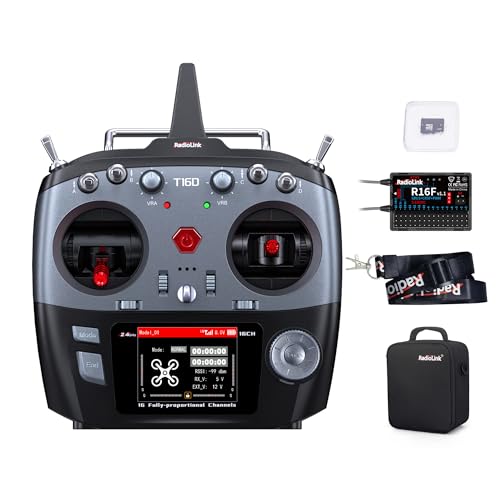
5. Radiolink T16D 16 Channels RC Transmitter: best for advanced multi-model pilots
The Radiolink T16D is a 16-channel radio aimed at experienced pilots and those planning to grow into advanced models. It supports several long-range modules and telemetry. It sits at the top of the price range in this round-up.
If you are moving up from a basic four- or six-channel radio, this model offers far more room to control extra functions. That room comes with more setup work, so it fits best when you already know what you want to control.
Best use cases
This radio suits complex airplanes, large models and multi-function setups that need many channels. Examples include retractable landing gear, flap mixing, smoke systems and separate controls for lights or sound. It also fits pilots who fly several types of models and want one radio for all of them.
Simulator support makes it useful for practice between flights. You can rehearse new setups and unusual flight modes on the ground before trying them in the air.
Key features in simple words
The radio supports ELRS, TBS Crossfire and other common long-range modules. Long-range modules matter most when you fly far from your position or in areas with heavy radio noise, because they are designed to keep the link stable over distance.
Its telemetry shows signal strength, battery voltage and receiver voltage when paired with the R16F receiver. These readings help you spot a weak link or a low battery before it becomes a problem. A built-in speaker lets you record custom voice alerts, so the radio can call out warnings while you keep your eyes on the model.
The maker lists a range of up to 4 kilometers and a 3ms response across all 16 channels. Real-world range depends on the module, the antennas, the environment and local rules, so treat the listed figure as the manufacturer’s claim.
The radio can work with several simulators without a separate dongle, after a firmware update to version 1.7.1, as the data notes. Radios with this many channels can also feel busy at first, so setup takes patience.
Daily use feel
In practice, a 16-channel radio gives room for many functions, but each one needs setting up. Most beginners will not use every channel on day one. You can start with the controls you need for a single model and add more as your flying grows.
The voice alerts and telemetry readouts make it easier to track a flight without looking down at a separate device. Many pilots find this helpful during longer sessions, when it is easy to lose track of battery levels or signal quality.
Performance and ease of use
The listed response time matches the other high-end options in this round-up. Setup is more involved than with the simpler radios, because the menus cover far more functions. Expect to spend time reading the manual, binding your receiver and checking each channel’s direction and travel before your first flight.
Pilots who are new to RC may want a few weeks with a simpler radio first. Learning basic flight control on a smaller radio can make the advanced menus of this model feel far less intimidating later.
Value for money
This is the highest-priced radio in the round-up. The extra channels, telemetry and module support justify the cost for pilots who will use them. If you only need a few channels, you pay for capability you may never touch.
For a basic airplane, the same money may go further on a smaller radio. Spending less on the transmitter can leave room in the budget for better receivers, batteries or a quality simulator.
Pros
- Sixteen channels for complex models
- Supports ELRS, TBS Crossfire and other long-range modules
- Integrated telemetry with the R16F receiver
- Simulator support without a dongle after firmware update
Cons
- Highest price in this round-up
- Many functions can overwhelm a first-time pilot
- Full simulator support requires a firmware update to version 1.7.1
Radio transmitter comparison: performance, ease of use and value for money
The five radios differ mainly in channel count and extra features. The six-channel Flysky FS-i6 is the simplest, while the sixteen-channel Radiolink T16D is the most capable. The other three sit between them, each offering a different balance of controls and complexity.
On performance, the listed range and response figures are close across the Radiolink models. Actual range depends on the environment, antenna placement and the receiver paired with the radio. Obstacles such as buildings, trees and metal structures can shorten the usable distance. Treat the maker’s figures as the best case, not a guarantee.
On ease of use, the Flysky FS-i6 has the gentlest learning curve. Its controls are few, its menus are short, and most beginners can set up a basic airplane without much reading. The Radiolink T8FB asks you to use a phone app for some settings, which some beginners like and others find less direct. The larger radios reward patience but take longer to master, especially when you start mixing functions.
On value, the Flysky FS-i6 offers the lowest entry cost and includes a receiver, so you can start flying without buying extra parts. The Radiolink T8FB and T12D V2 give more channels for a moderate price, which suits pilots who expect to add features over time.
The T16D costs the most and makes sense mainly for pilots who will use its full set of functions. For a simple trainer, paying for unused channels is money you may not need to spend.
Buying guide: key factors for picking an RC airplane transmitter
The number of channels is one of the first things to check. A channel is one control you can move, such as throttle, elevator, rudder or aileron. A basic airplane needs about four to six, while complex models with flaps, retracts or lighting use more. Count the functions your aircraft needs before you compare radios.
Frequency and range also matter. Most modern radios use 2.4GHz, which resists interference well and avoids the frequency conflicts common with older systems. The listed range figures show what the maker expects under good conditions, so read them as a rough guide. Real-world range will be shorter once you add obstacles, electrical noise or a weak receiver antenna.
Receiver compatibility is another key point. Some radios work only with their own brand’s receivers, as the Radiolink AT10II does. Others support several protocols, which gives you more choice when you buy a receiver later. Check which receivers a radio supports before you buy, so the parts work together without surprises.
Battery type and power source should match your plan. Some radios use AA batteries, which are easy to find in a field. Others take LiPo packs or a USB-C power bank, which may last longer but need a suitable charger and careful handling. Make sure you have the right battery and a charger for it before your first flight day.
Telemetry gives on-screen data like battery voltage and signal strength. It is helpful for safety, because it warns you before power runs low or the link weakens. It is not essential for every beginner, and it adds cost and setup steps. Decide if you need it now or might want it later, and check that the radio and receiver both support it.
Finally, consider how you will learn. A simulator connection lets you practice takeoffs, landings and turns on a computer before you fly a real model. Some radios support simulators directly over USB, while others need an extra dongle or adapter. Practicing on a simulator first can reduce crash repairs and build confidence before you take the aircraft outdoors.
Who should buy these products: matching each buyer to a radio
A first-time buyer with a simple trainer airplane should look at the Flysky FS-i6. It keeps controls few, includes a receiver and costs the least. This is a sensible way to learn the basics.
A hobbyist who wants more control without a large spend should consider the Radiolink T8FB. It offers eight channels, app setup and wide compatibility. It suits someone who tries several model types, such as a trainer one month and a glider the next.
A pilot who wants telemetry and on-screen data, along with a larger control set, should look at the Radiolink AT10II. Its screen shows battery voltage, and the twelve channels leave room to grow. It fits a pilot moving past basic radios and wanting more information during a flight.
A pilot who plans to fly FPV or wants to add a long-range module later should consider the Radiolink T12D V2. Its module bay supports ELRS and TBS Crossfire. It also suits instructors who want a wireless trainer setup, so a student can fly while the instructor holds a backup controller.
An experienced multi-model pilot with complex airplanes should look at the Radiolink T16D. Its sixteen channels, telemetry and simulator support match advanced needs. A beginner who buys it should expect a longer learning period, since many of those functions take time to set up and understand.
Final verdict: which RC airplane transmitter fits your needs
No single radio suits every pilot. The right choice depends on your model, budget and how quickly you want to grow. Matching the radio to your current needs usually works better than buying the most channels.
For most true beginners, the Flysky FS-i6 is the simplest starting point. For a balance of channels and app setup, the Radiolink T8FB is a practical middle choice. Pilots who want telemetry and room to grow may prefer the Radiolink AT10II or T12D V2.
In short, start with the needs of your first airplane and upgrade when your skills call for it. Read the maker’s specifications and check receiver compatibility before you buy. That approach keeps the decision clear and the cost sensible, and it leaves you free to add features later.
Frequently Asked Questions about RC airplane transmitters
What is an RC airplane transmitter?
An RC airplane transmitter is the handheld radio you use to send control signals to a model airplane. It is also called a radio or radio controller. The receiver in the airplane picks up those signals and moves the control surfaces, such as the ailerons, elevator and rudder.
How many channels does a beginner need?
Most basic airplanes need about four to six channels. Six channels cover throttle, aileron, elevator, rudder and a switch or two. More channels are useful for complex models with extra functions, such as retractable landing gear or flaps.
Do I need telemetry on my first radio?
Telemetry is helpful but not essential for a first setup. It shows data such as battery voltage and signal strength on screen. Many beginners add it later once they know what to watch and why those numbers matter.
Can I use one transmitter with different brands of receivers?
Not always. Some radios work only with their own brand’s receivers, while others support a wider range of protocols. Check the compatibility list before you buy, so the radio and receiver work together without trouble.
Is a simulator worth using before flying?
A simulator lets you practice controls without risk to a real airplane. Some radios connect to simulators directly, while others need an extra cable or adapter. Practicing in a simulator can help you learn the controls and respond calmly before your first flight.

Peterson is an RC hobby enthusiast and product reviewer with a passion for remote-controlled cars, trucks, boats, drones, and accessories. He enjoys testing the latest RC products, comparing features, and sharing practical buying guides to help beginners and experienced hobbyists make informed decisions. Through RCThing.com, Peterson provides honest reviews, maintenance tips, and expert advice to help readers get the most from their RC adventures.