5 Best Soldering Iron For Rc In 2026
As an Amazon Associate we earn from qualifying purchases.
Radio-controlled models, from cars and planes to drones, rely on solid wiring. A loose or weak solder joint can cause a motor to stop or a battery connector to fail. That is why many hobbyists look for the best soldering iron for RC work before they start building or repairing. This guide helps beginners who have never soldered before and want to understand the options.
The five products in this round-up share a few traits. Each one is sold as a soldering tool for electronics, with adjustable heat and a stand. They differ in power, control, portability and how much comes in the box. This comparison rests on the listed features and typical use, not on personal testing.



1. Soldering Iron Kit: best budget pick for basic beginner work
The Soldering Iron Kit from Q-MING is a pen-style iron with a digital display. It is sold as a complete starter set, which suits buyers who want everything in one box. It is a sensible first tool for simple RC wiring tasks such as attaching connectors or tinning wire ends.
Who it suits
This kit is aimed at beginners and people on a tight budget. It also suits occasional users who only need to solder a few joints on a model. Buyers who plan to work for hours each week may want a stronger station.
Key features in simple terms
The iron is rated at 80W and is listed to heat up within about 20 seconds. Its temperature range runs from 180°C to 480°C (356°F to 896°F). The LCD screen shows the current temperature, so the user does not have to guess the setting.
The handle is heat resistant, which helps keep the grip comfortable during longer sessions. The kit includes tips, a simple stand, a sponge, solder wire and flux paste. Flux is a paste that helps solder flow and stick to metal.
Real-life use
In daily use, most buyers set the temperature once and leave it there for common tasks. The digital readout removes some guesswork. Because the pen shape is slim, it can reach tight spots inside a model’s electronics.
Performance and ease of use
The quick heat-up and clear display make it easy to start soldering without much setup. The stand keeps the hot tip off the bench when it is not in use. Still, the tip and stand are basic, so the kit may need replacement parts over time.
Value for money
At a low price, this kit gives a beginner many of the basic items needed to start. It is a practical way to learn before investing in a more advanced station. Buyers should expect a simpler build than higher-priced options.
Pros
- Low price for a complete starter kit
- Digital display shows the set temperature clearly
- Includes solder, flux paste, sponge and tips
- Heats up quickly for a basic pen iron
Cons
- The stand and build are basic compared with station-style irons
- Fewer extra tools, so buyers may need helpers or a solder sucker later
- Not designed for heavy or continuous professional work
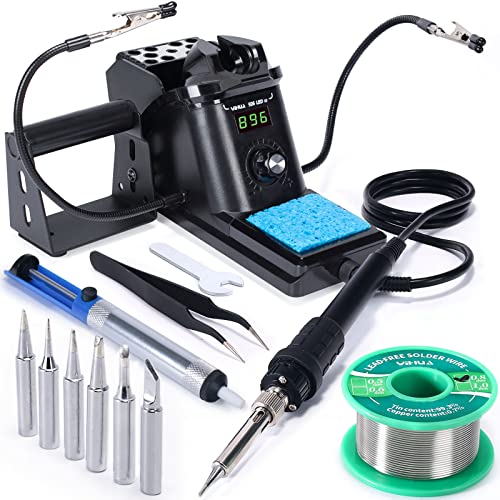
2. YIHUA 926 III 60W Digital Display Soldering: best for a full workbench setup
The YIHUA 926 III is a soldering station, meaning the iron connects to a base unit that controls heat. Stations are common on hobby benches because they keep settings steady. This kit adds extras, including helping hands and a solder sucker, which are tools for holding parts and removing solder.
Who it suits
This station suits hobbyists who plan to solder regularly and want a dedicated workspace. It also fits users who want a complete kit with extra accessories. Buyers who only need one or two joints may find it more than they need.
Key features in sim ple terms
The station offers a temperature range from about 194°F to 896°F, with PID control. PID is a control method that keeps the iron close to the set temperature. The display can switch between Celsius and Fahrenheit.
A sleep mode can be set to 5, 10 or 30 minutes. This lowers the heat when the iron sits unused, which can extend the life of the tip and heating element. The station also includes a metal mesh guard at the rear to reduce accidental contact.
The package is a 12-in-1 set. It includes six tips, a roll of lead-free solder, a solder sucker, ESD safe tweezers, a solder wire dispenser and a cleaning sponge. ESD safe means the tweezers are designed to limit static discharge that could harm sensitive parts.
Real-life use
Most users keep the station on the bench and switch between tasks without changing much. The sleep timer means the iron does not need to be turned off after every pause. The integrated holder saves space on a small desk.
Performance and ease of use
The station heats fast and holds its temperature steadily, which helps joints form cleanly. The master control knob keeps adjustments simple. The unit is designed for 110 to 127 volts with a US-standard plug.
Value for money
The price sits above the simple pen kit, but the station and accessories give a more complete workbench. Buyers who expect to solder often may find the added control worth the extra cost. Those with occasional needs may prefer a lower-cost option.
Pros
- Stable temperature control with a clear digital display
- Includes helping hands, a solder sucker and six tips
- Sleep mode and temperature calibration support
- Compact design with a built-in iron holder
Cons
- Costs more than basic pen-style kits
- Designed for 110 to 127 volts, which may not suit every region
- Larger than a simple pen, so it takes up more bench space
3. Soldering Station: best mid-range station for beginners and hobbyists
This Crtsweker soldering station sits between the simple pen and the premium station. It uses a base unit with an LED display and a set of accessories. It suits users who want more control than a basic iron but still want a moderate price.
Who it suits
This station fits beginners who want a proper bench tool without a high cost. It also suits hobbyists who solder for crafts, small electronics or occasional repairs. Users who need a rugged tool for daily professional work may want a stronger model.
Key features in simple terms
The station heats quickly and adjusts between 180°C and 480°C (356°F and 896°F). It can switch between Celsius and Fahrenheit. A calibration function is included to help keep the reading accurate.
An auto sleep feature lets the iron rest at a low temperature after a period of no use. The timer can be set from 0 to 600 seconds. An on/off switch also lets the user turn the iron off fully, which can help keep children from touching a hot tip.
The steel tube has four vents, which the maker says helps the iron cool faster if work is interrupted. The handle is covered in silicone to improve grip and comfort. The kit includes a helping hands stand, a solder dispenser, a sponge, a tip cleaner, five tips, tweezers, a solder sucker, solder wire, a screwdriver and a mini wrench.
Real-life use
Users often find the compact base easy to keep on a small desk. The silicone sleeve makes longer sessions feel more comfortable in the hand. The extra tools mean fewer trips to buy supplies.
Performance and ease of use
Fast heating and a clear LED display make setup straightforward. The wider temperature range covers many common tasks. Because the accessory list is long, beginners can start soldering without buying many extras.
Value for money
The price sits in the middle of this group. The included accessories add real value for a beginner building the basic workbench from the start. Buyers who compare it with a pen kit should weigh the larger accessory list against the simpler design.
In short, it offers a balanced mix of control and extras for the price.
Pros
- Digital display with switchable Celsius and Fahrenheit readings
- Auto sleep timer and on/off switch add safety
- Long accessory list, including solder, tips and a sucker
- Silicone-covered handle for a more comfortable grip
Cons
- Sales standing is moderate, so fewer user opinions may be available
- The build is lighter than premium stations, which some buyers may notice
- Tip variety is limited to the five included tips
4.
Fanttik T1 Max Cordless Soldering Iron: best for portable and small-space repairs
The Fanttik T1 Max is a cordless iron. It runs on a built-in battery in wireless mode and can also be used with a cable. Cordless irons suit users who work away from a power outlet or who have little bench space.
Who it suits
This iron suits people who want to repair models in the field, at a friend’s home or in a tight workspace. It also fits users who value a tidy desk and a compact design. Buyers who need high heat for thick connections may prefer a corded station.
Key features in simple terms
The iron is listed to heat up in about seven seconds. In wireless mode, the built-in 2600mAh battery supplies up to 12W for up to 60 minutes at 840°F (450°C). In wired mode, the maximum output is 16W, and it can be powered by a charger or power bank with a USB-C port.
A six-level dial lets the user set temperatures between 390°F and 840°F (200°C to 450°C). Lower settings can help protect heat-sensitive parts. The package includes four C210 tips and an aluminum stand that stores the tip.
Gravity sensing puts the iron into sleep mode after 30 seconds without movement. It heats back up when picked up. A red light flashes during heating and turns green when the iron is ready.
Real-life use
Many users find the cordless design handy for quick jobs that would otherwise need a long extension cord. The stand keeps the workbench clean. The sleep feature means the iron does not stay hot while sitting still.
Performance and ease of use
The fast heat-up and simple indicator lights make the iron easy to start. The six-level dial gives control across a sensible range. Because the output is lower than a full station, it may take more care on larger joints.
Value for money
The price is higher than the basic kits. Buyers pay for portability and a compact, tidy design. Those who mainly work at one bench may find a corded station offers more for the same money.
Pros
- Cordless design suits field repairs and small spaces
- Heats in about seven seconds, according to the listing
- Six temperature levels help protect heat-sensitive parts
- Gravity sensing sleep mode helps reduce idle heat
Cons
- Lower power output than full stations may slow larger joints
- Battery runtime depends on use, so long sessions may need a recharge
- Costs more than basic corded kits
5. Soldering Iron Premium Kit: best for varied hobby tasks on a budget
The MEAKEST Soldering Iron Premium Kit is a 60W pen-style iron with a ceramic heater. It is sold with a wide mix of tips and extras. The name says premium, but the design is closer to a standard pen iron with a larger kit.
Who it suits
This kit suits beginners and hobbyists who work on a range of small items, such as guitars, watches, wires and small electronics. It also fits buyers who want many access sories in one box. Buyers who need high power for heavy work may want a stronger iron.
Key features in simple terms
The iron is rated at 60W with an adjustable range from 200°C to 450°C. A ceramic heater helps the iron warm up and hold heat. Six air vents are included to help prevent overheating and extend the life of the iron.
An on/off switch lets the user turn the iron off when it is not needed. The handle uses heat-resistant silicone, which helps with grip and hand protection. The kit includes different tip shapes, solder wire, solder paste and a solder pump.
The listing says the solder wire and paste capacity has been increased. This means fewer trips to buy extra supplies during early projects.
Real-life use
In daily use, the wide tip selection lets the user switch shapes for different parts. The on/off switch makes it easy to pause without unplugging. The silicone cover helps keep the handle comfortable during short jobs.
Performance and ease of use
The 60W output is lower than the 80W pen kit, so heating larger joints may take a little longer. The adjustable dial makes it simple to match the setting to the task. The included pump and paste help with common cleanup and joining tasks.
Value for money
The price sits in the lower-middle range of this group. The large accessory list gives a beginner plenty to work with from the first day. Buyers who want steady control or heavy-duty power may prefer a station.
Pros
- Wide range of tip shapes for varied small projects
- On/off switch and adjustable temperature help with safety
- Includes solder wire, solder paste and a solder pump
- Silicone protective cover improves grip and comfort
Cons
- Lower power than the 80W pen kit may slow larger joints
- Pen-style design lacks the stable base of a station
- Display and control features are simpler than digital station models
Comparison insights: how the five soldering irons differ
The five products fall into two broad groups. Three are pen-style or compact irons, while two are station-style bench units. Each group has a different balance of control, portability and cost.
In performance, the stations offer steadier temperature control and more power, which helps with larger connections. The pen kits heat quickly and suit small joints. The cordless iron trades some power for freedom from a cable.
Ease of use depends on experience and workspace. Digital displays make temperature settings easy to read. Accessory lists also matter, because a full set saves time for beginners. Still, a longer list does not always mean better quality.
Value for money depends on how often the iron will be used. The budget pen kit gives many basics at a low price. The mid-range and premium options cost more but add control, extra tools or portability. In short, the right choice depends on the work ahead.
Buying guide: key factors for picking a soldering iron for RC work
Picking a soldering iron starts with the type of work. Small wire joints and connectors need less power than thick battery leads. Knowing the common tasks helps narrow the choice.
Temperature control
Temperature control is the setting that determines how hot the tip gets. A range that covers roughly 200°C to 450°C suits many electronics tasks. Digital displays make the setting easier to read and adjust.
Power and heat-up time
Power, measured in watts, affects how fast the iron heats and how well it holds heat on larger parts. Higher wattage can help with bigger joints. Quick heat-up time saves waiting between jobs.
Stations and pen-style irons
A station uses a base unit to control heat and usually offers steadier settings. A pen-style iron is lighter and easier to store, but it may offer fewer controls. Beginners should consider how much bench space they have.
Tips and accessories
Tips are the metal parts that touch the joint. Different shapes suit different parts, so a few extra tips can be useful. Helpers, solder, flux and a sponge are common extras that many beginners common extras that many beginners find helpful. Sponges or tip cleaners keep the tip clean, which improves how solder flows.
A solder sucker removes extra solder when a joint needs correction.
Safety features
An on/off switch lets the user turn the iron off fully when it is not in use. Sleep modes lower the heat during pauses, which can reduce wear on the tip.
Heat-resistant handles and silicone sleeves help protect the hand during longer sessions.
Portability and space
A cordless iron suits repairs away from a bench. A compact station saves space on a small desk. Think about where the work will usually happen before deciding.
Ease of use
Clear displays, simple dials and a sturdy stand make daily use easier. Beginners often benefit from fewer buttons and a clear temperature readout. Good ergonomics help reduce hand fatigue.
Who should buy these products: matching buyers to a soldering iron
Each product suits a different kind of buyer. The right match depends on budget, workspace and the types of tasks planned. The notes below offer a simple starting point.
Someone who wants the lowest cost for basic RC wiring may prefer the Soldering Iron Kit. Its complete starter set covers the essentials without a large outlay. It suits a first project or occasional fixes.
A hobbyist who plans to solder often and wants a dedicated bench may prefer the YIHUA 926 III. Its station control, sleep mode and extra tools suit steady use. It fits buyers who value stable temperature control.
A beginner who wants a mid-range station with a long accessory list may consider the Crtsweker Soldering Station. It offers switchable temperature units, safety features and many included tools. It suits users who want a balanced option.
Someone who repairs models away from home or works in a very small space may prefer the Fanttik T1 Max. Its cordless design and quick heat-up suit portable jobs. It fits buyers who accept lower output in exchange for freedom from a cable.
A buyer who works on a wide variety of small items on a modest budget may consider the MEAKEST Premium Kit. Its tip variety and included solder tools support varied hobby tasks. It suits people who want many extras in one box.
Final verdict: which soldering iron fits RC work best
No single product suits every buyer. The simple pen kit gives beginners a low-cost way to start. The stations offer steadier control for regular work, while the cordless iron serves portable repairs.
For most beginners, a mid-range station or the YIHUA station offers a good balance of control and value. Those with a tight budget can start with a basic pen kit and upgrade later. In short, match the tool to the work and the workspace.
Frequently Asked Questions about the best soldering iron for RC
Do I need a station or can I start with a pen-style iron?
A pen-style iron can handle basic RC wiring and small joints. A station offers steadier temperature control and more power for larger work. Many beginners start with a pen and move to a station later.
What temperature should I use for electronics soldering?
Many electronics tasks use a range around 200°C to 450°C. The right setting depends on the solder and the part. Adjusting in small steps helps avoid overheating sensitive components.
Is a cordless soldering iron good enough for RC repairs?
A cordless iron can handle small repairs and quick fixes. It may be slower on thick connections because of its lower output. A corded station is often better for regular, heavy work.
What extras should a beginner buy with a soldering iron?
Solder, a sponge or tip cleaner, a solder sucker and helping hands are common useful extras. Flux helps solder flow and stick to metal. Many kits include these items already.
Are sleep modes and auto-off features worth having?
Sleep modes lower the heat when the iron sits unused, which can reduce wear on the tip. Auto-off and on/off switches add safety, especially around children. These features are useful for beginners who may pause often.

Peterson is an RC hobby enthusiast and product reviewer with a passion for remote-controlled cars, trucks, boats, drones, and accessories. He enjoys testing the latest RC products, comparing features, and sharing practical buying guides to help beginners and experienced hobbyists make informed decisions. Through RCThing.com, Peterson provides honest reviews, maintenance tips, and expert advice to help readers get the most from their RC adventures.